
Author: admin
How to deploy an EC2 instance in AWS with Terraform
- How to install terraform
- How to configure your aws cli
- How to steup your file structure
- How to deploy your instance
- You must have an AWS account already setup
- You have an existing VPC
- You have existing security groups
Depending on which machine you like to use. I use varied distros for fun.
For this we will use Ubuntu 22.04
How to install terraform
- Once you are logged into your linux jump box or whatever you choose to manage.
wget -O- https://apt.releases.hashicorp.com/gpg | sudo gpg –dearmor -o /usr/share/keyrings/hashicorp-archive-keyring.gpg
echo “deb [signed-by=/usr/share/keyrings/hashicorp-archive-keyring.gpg] https://apt.releases.hashicorp.com $(lsb_release -cs) main” | sudo tee /etc/apt/sources.list.d/hashicorp.list
sudo apt update && sudo apt install terraform
ThanosJumpBox:~/myterraform$ terraform -v
Terraform v1.8.2
on linux_amd64
+ provider registry.terraform.io/hashicorp/aws v5.47.
- Okay next you want to install the awscli
sudo apt update
sudo apt install awscli
2. Okay Now you need to go into your aws and create a user and aws cli key
- Log into your aws console
- Go to IAM
- Under users create a user called Terrform-thanos
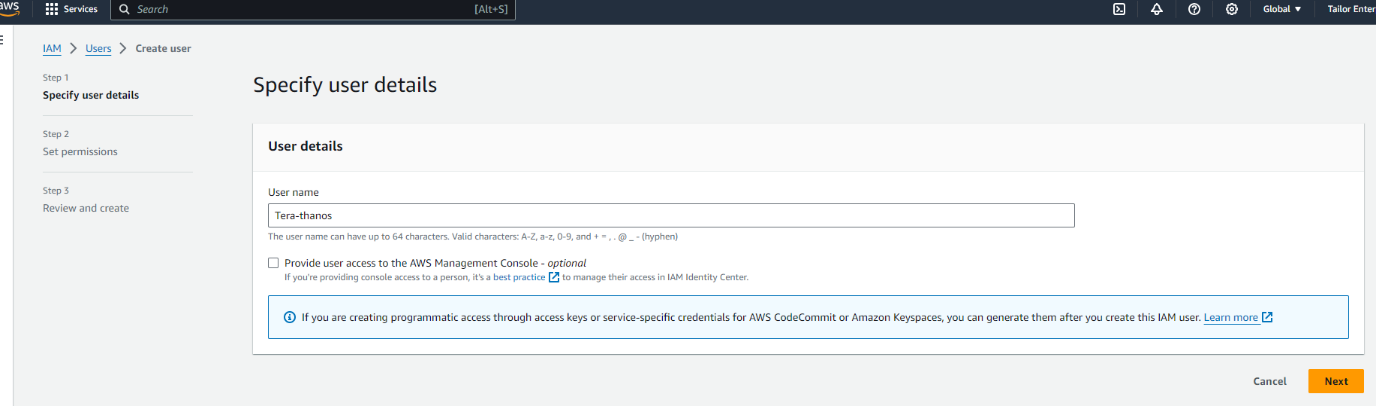
Next you want to either create a group or add it to an existing. To make things easy for now we are going to add it administrator group
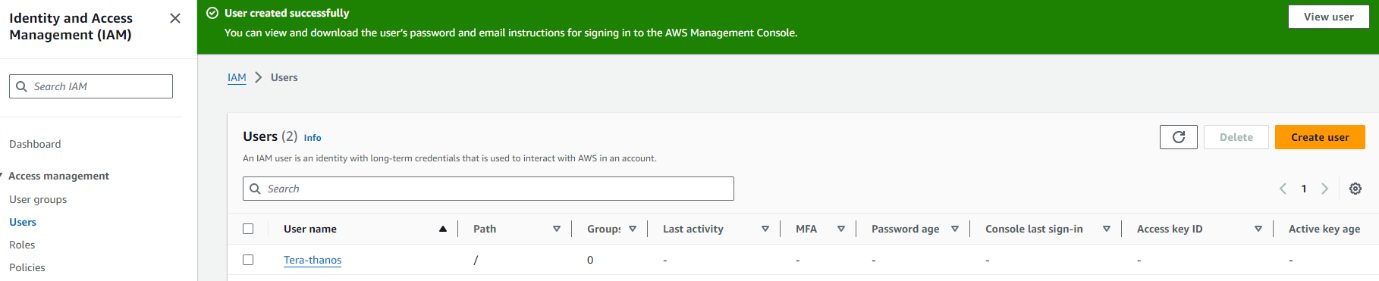
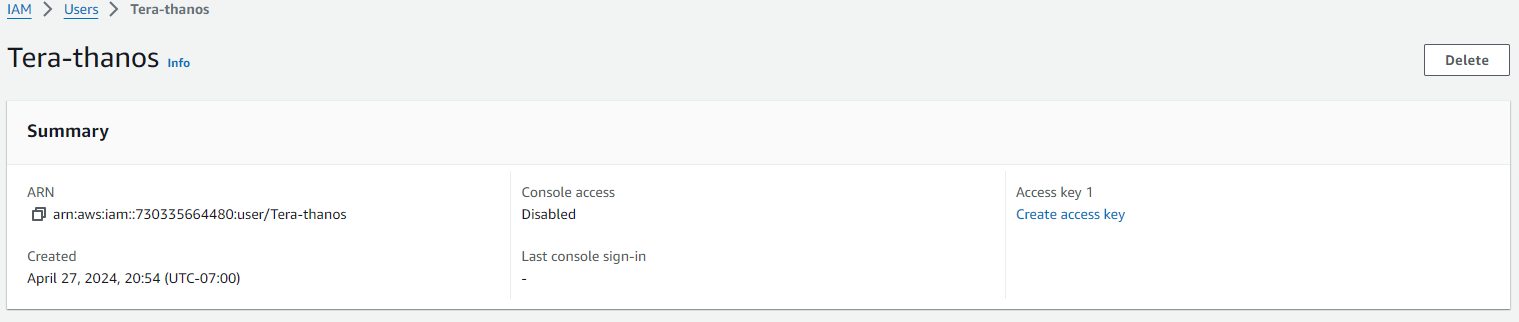
Next click on the new user and create the ACCESS KEY
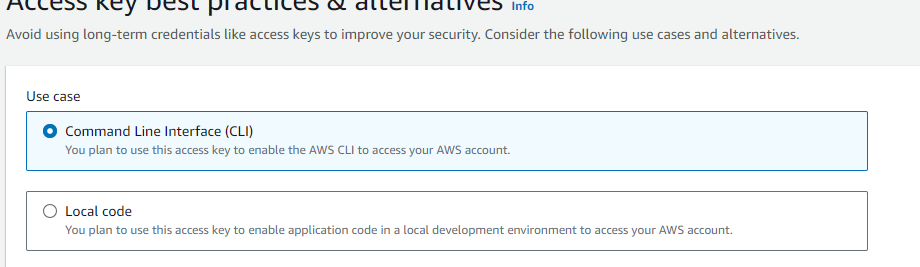
Next select the use case for the key
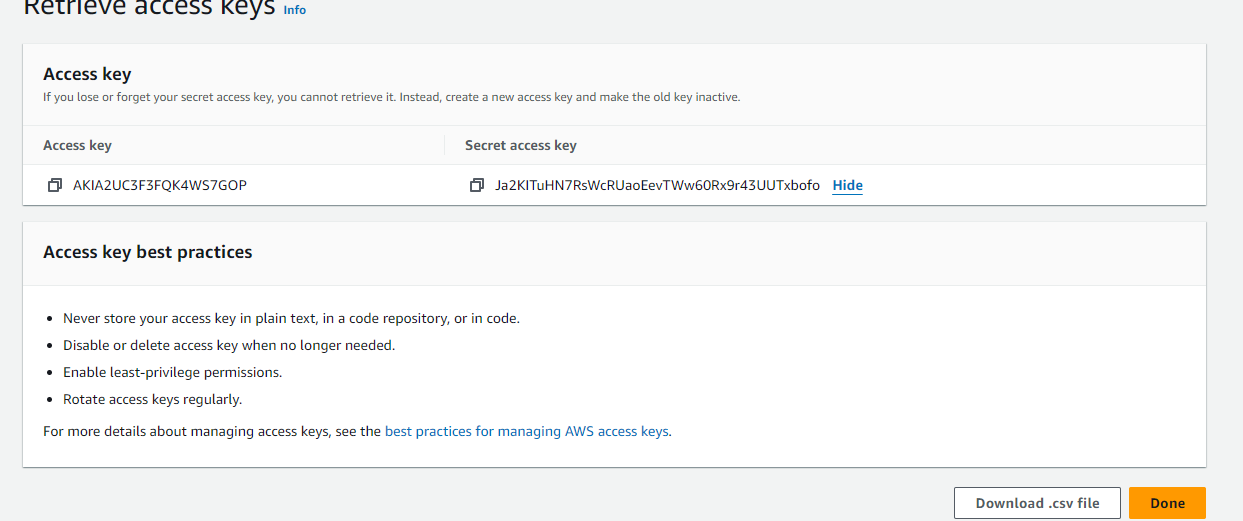
Once you create the ACCESS-KEY you will see the key and secret
Copy these to a text pad and save them somewhere safe.
Next you we going to create the RSA key pair
- Go under EC2 Dashboard
- Then Network & ecurity
- Then Key Pairs
- Create a new key pair and give it a name

Now configure your Terrform to use the credentials
AWS Access Key ID [****************RKFE]:
AWS Secret Access Key [****************aute]:
Default region name [us-west-1]:
Default output format [None]:
So a good terraform file structure to use in work environment would be
my-terraform-project/
├── main.tf
├── variables.tf
├── outputs.tf
├── provider.tf
├── modules/
│ ├── vpc/
│ │ ├── main.tf
│ │ ├── variables.tf
│ │ └── outputs.tf
│ └── ec2/
│ ├── main.tf
│ ├── variables.tf
│ └── outputs.tf
├── environments/
│ ├── dev/
│ │ ├── main.tf
│ │ ├── variables.tf
│ │ └── outputs.tf
│ ├── prod/
│ │ ├── main.tf
│ │ ├── variables.tf
│ │ └── outputs.tf
├── terraform.tfstate
├── terraform.tfvars
└── .gitignore
That said for the purposes of this post we will keep it simple. I will be adding separate posts to deploy vpc’s, autoscaling groups, security groups etc.
This would also be very easy to display if you VSC to connect to your
linux machine
|
mkdir myterraform cd myterraform touch main.tf outputs.tf variables.tf |
So we are going to create an Instance as follows
Main.tf
provider “aws” {
region = var.region
}
resource “aws_instance” “my_instance” {
ami = “ami-0827b6c5b977c020e“ # Use a valid AMI ID for your region
instance_type = “t2.micro“ # Free Tier eligible instance type
key_name = “” # Ensure this key pair is already created in your AWS account
subnet_id = “subnet-0e80683fe32a75513“ # Ensure this is a valid subnet in your VPC
vpc_security_group_ids = [“sg-0db2bfe3f6898d033“] # Ensure this is a valid security group ID
tags = {
Name = “thanos-lives”
}
root_block_device {
volume_type = “gp2“ # General Purpose SSD, which is included in the Free Tier
volume_size = 30 # Maximum size covered by the Free Tier
}
Outputs.tf
output “instance_ip_addr” {
value = aws_instance.my_instance.public_ip
description = “The public IP address of the EC2 instance.”
}
output “instance_id” {
value = aws_instance.my_instance.id
description = “The ID of the EC2 instance.”
}
output “first_security_group_id” {
value = tolist(aws_instance.my_instance.vpc_security_group_ids)[0]
description = “The first Security Group ID associated with the EC2 instance.”
}
Variables.tf
variable “region” {
description = “The AWS region to create resources in.”
default = “us-west-1”
}
variable “ami_id” {
description = “The AMI ID to use for the server.”
}
Terraform.tfsvars
region = “us-west-1”
ami_id = “ami-0827b6c5b977c020e“ # Replace with your chosen AMI ID
Deploying your code:
Initializing the backend…
Initializing provider plugins…
– Reusing previous version of hashicorp/aws from the dependency lock file
– Using previously-installed hashicorp/aws v5.47.0
Terraform has been successfully initialized!
You may now begin working with Terraform. Try running “terraform plan” to see
any changes that are required for your infrastructure. All Terraform commands
should now work.
If you ever set or change modules or backend configuration for Terraform,
rerun this command to reinitialize your working directory. If you forget, other
commands will detect it and remind you to do so if necessary.
thanosjumpbox:~/my-terraform$ terraform$
thanosjumpbox:~/my-terraform$ terraform$ terraform plan
Terraform used the selected providers to generate the following execution plan. Resource actions are indicated with the following symbols:
+ create
Terraform will perform the following actions:
# aws_instance.my_instance will be created
+ resource “aws_instance” “my_instance” {
+ ami = “ami-0827b6c5b977c020e”
+ arn = (known after apply)
+ associate_public_ip_address = (known after apply)
+ availability_zone = (known after apply)
+ cpu_core_count = (known after apply)
+ cpu_threads_per_core = (known after apply)
+ disable_api_stop = (known after apply)
+ disable_api_termination = (known after apply)
+ ebs_optimized = (known after apply)
+ get_password_data = false
+ host_id = (known after apply)
+ host_resource_group_arn = (known after apply)
+ iam_instance_profile = (known after apply)
+ id = (known after apply)
+ instance_initiated_shutdown_behavior = (known after apply)
+ instance_lifecycle = (known after apply)
+ instance_state = (known after apply)
+ instance_type = “t2.micro“
+ ipv6_address_count = (known after apply)
+ ipv6_addresses = (known after apply)
+ key_name = “nicktailor-aws”
+ monitoring = (known after apply)
+ outpost_arn = (known after apply)
+ password_data = (known after apply)
+ placement_group = (known after apply)
+ placement_partition_number = (known after apply)
+ primary_network_interface_id = (known after apply)
+ private_dns = (known after apply)
+ private_ip = (known after apply)
+ public_dns = (known after apply)
+ public_ip = (known after apply)
+ secondary_private_ips = (known after apply)
+ security_groups = (known after apply)
+ source_dest_check = true
+ spot_instance_request_id = (known after apply)
+ subnet_id = “subnet-0e80683fe32a75513”
+ tags = {
+ “Name” = “Thanos-lives”
}
+ tags_all = {
+ “Name” = “Thanos-lives”
}
+ tenancy = (known after apply)
+ user_data = (known after apply)
+ user_data_base64 = (known after apply)
+ user_data_replace_on_change = false
+ vpc_security_group_ids = [
+ “sg-0db2bfe3f6898d033”,
]
+ root_block_device {
+ delete_on_termination = true
+ device_name = (known after apply)
+ encrypted = (known after apply)
+ iops = (known after apply)
+ kms_key_id = (known after apply)
+ tags_all = (known after apply)
+ throughput = (known after apply)
+ volume_id = (known after apply)
+ volume_size = 30
+ volume_type = “gp2”
}
}
Plan: 1 to add, 0 to change, 0 to destroy.
Changes to Outputs:
+ first_security_group_id = “sg-0db2bfe3f6898d033”
+ instance_id = (known after apply)
+ instance_ip_addr = (known after apply)
─────────────────────────────────────────────────────────────────────────────────────────────────────────────────────────────────────────────
Note: You didn’t use the -out option to save this plan, so Terraform can’t guarantee to take exactly these actions if you run “terraform
apply” now.
Terraform used the selected providers to generate the following execution plan. Resource actions are indicated with the following symbols:
+ create
Terraform will perform the following actions:
# aws_instance.my_instance will be created
+ resource “aws_instance” “my_instance” {
+ ami = “ami-0827b6c5b977c020e”
+ arn = (known after apply)
+ associate_public_ip_address = (known after apply)
+ availability_zone = (known after apply)
+ cpu_core_count = (known after apply)
+ cpu_threads_per_core = (known after apply)
+ disable_api_stop = (known after apply)
+ disable_api_termination = (known after apply)
+ ebs_optimized = (known after apply)
+ get_password_data = false
+ host_id = (known after apply)
+ host_resource_group_arn = (known after apply)
+ iam_instance_profile = (known after apply)
+ id = (known after apply)
+ instance_initiated_shutdown_behavior = (known after apply)
+ instance_lifecycle = (known after apply)
+ instance_state = (known after apply)
+ instance_type = “t2.micro“
+ ipv6_address_count = (known after apply)
+ ipv6_addresses = (known after apply)
+ key_name = “nicktailor-aws”
+ monitoring = (known after apply)
+ outpost_arn = (known after apply)
+ password_data = (known after apply)
+ placement_group = (known after apply)
+ placement_partition_number = (known after apply)
+ primary_network_interface_id = (known after apply)
+ private_dns = (known after apply)
+ private_ip = (known after apply)
+ public_dns = (known after apply)
+ public_ip = (known after apply)
+ secondary_private_ips = (known after apply)
+ security_groups = (known after apply)
+ source_dest_check = true
+ spot_instance_request_id = (known after apply)
+ subnet_id = “subnet-0e80683fe32a75513”
+ tags = {
+ “Name” = “Thanos-lives”
}
+ tags_all = {
+ “Name” = “Thanos-lives”
}
+ tenancy = (known after apply)
+ user_data = (known after apply)
+ user_data_base64 = (known after apply)
+ user_data_replace_on_change = false
+ vpc_security_group_ids = [
+ “sg-0db2bfe3f6898d033”,
]
+ root_block_device {
+ delete_on_termination = true
+ device_name = (known after apply)
+ encrypted = (known after apply)
+ iops = (known after apply)
+ kms_key_id = (known after apply)
+ tags_all = (known after apply)
+ throughput = (known after apply)
+ volume_id = (known after apply)
+ volume_size = 30
+ volume_type = “gp2”
}
}
Plan: 1 to add, 0 to change, 0 to destroy.
Changes to Outputs:
+ first_security_group_id = “sg-0db2bfe3f6898d033”
+ instance_id = (known after apply)
+ instance_ip_addr = (known after apply)
Do you want to perform these actions?
Terraform will perform the actions described above.
Only ‘yes’ will be accepted to approve.
Enter a value: yes
aws_instance.my_instance: Creating…
aws_instance.my_instance: Still creating… [10s elapsed]
aws_instance.my_instance: Still creating… [20s elapsed]
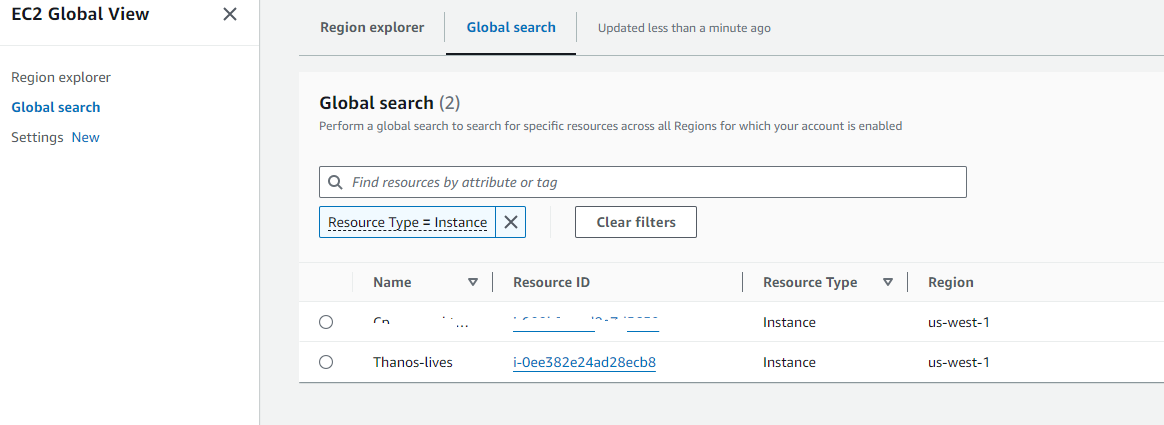
aws_instance.my_instance: Creation complete after 22s [id=i-0ee382e24ad28ecb8]
Apply complete! Resources: 1 added, 0 changed, 0 destroyed.
Outputs:
first_security_group_id = “sg-0db2bfe3f6898d033”
instance_id = “i-0ee382e24ad28ecb8”
instance_ip_addr = “50.18.90.217”
Result:
TightVNC Security Hole
Virtual Network Computing (VNC) is a graphical desktop-sharing system that uses the Remote Frame Buffer protocol (RFB) to remotely control another computer. It transmits the keyboard and mouse input from one computer to another, relaying the graphical-screen updates, over a network.[1]
VNC servers work on a variety of platforms, allowing you to share screens and keyboards between Windows, Mac, Linux, and Raspberry Pi devices. RDP server is proprietary and only works with one operating system. VNC vs RDP performance. RDP provides a better and faster remote connection.
There are a number of reasons why people use it.
There are a few VNC tools out there.
RealVNC
UltraVNC – Best one to use.
Tight-VNC – Security Hole
Tight-VNC has their encryption algorithm hardcoded into its software and appears they have NOT updated its encryption standards in years.
DES Encryption used
# This is hardcoded in VNC applications like TightVNC.
$magicKey = [byte[]]@(0xE8, 0x4A, 0xD6, 0x60, 0xC4, 0x72, 0x1A, 0xE0)
$ansi = [System.Text.Encoding]::GetEncoding(
[System.Globalization.CultureInfo]::CurrentCulture.TextInfo.ANSICodePage)
$pass = [System.Net.NetworkCredential]::new(”, $Password).Password
$byteCount = $ansi.GetByteCount($pass)
if ($byteCount –gt 8) {
$err = [System.Management.Automation.ErrorRecord]::new(
[ArgumentException]‘Password must not exceed 8 characters’,
‘PasswordTooLong‘,
[System.Management.Automation.ErrorCategory]::InvalidArgument,
$null)
$PSCmdlet.WriteError($err)
return
}
$toEncrypt = [byte[]]::new(8)
$null = $ansi.GetBytes($pass, 0, $pass.Length, $toEncrypt, 0)
$des = $encryptor = $null
try {
$des = [System.Security.Cryptography.DES]::Create()
$des.Padding = ‘None’
$encryptor = $des.CreateEncryptor($magicKey, [byte[]]::new(8))
$data = [byte[]]::new(8)
$null = $encryptor.TransformBlock($toEncrypt, 0, $toEncrypt.Length, $data, 0)
, $data
}
finally {
if ($encryptor) { $encryptor.Dispose() }
if ($des) { $des.Dispose() }
}
}
What this means is…IF you are using admin credentials on your machine while using Tight-VNC a hacker that is way better than I… Could gain access to your infrastructure by simply glimpsing the windows registry. Im sure there ways to exploit it.
I will demonstrate:
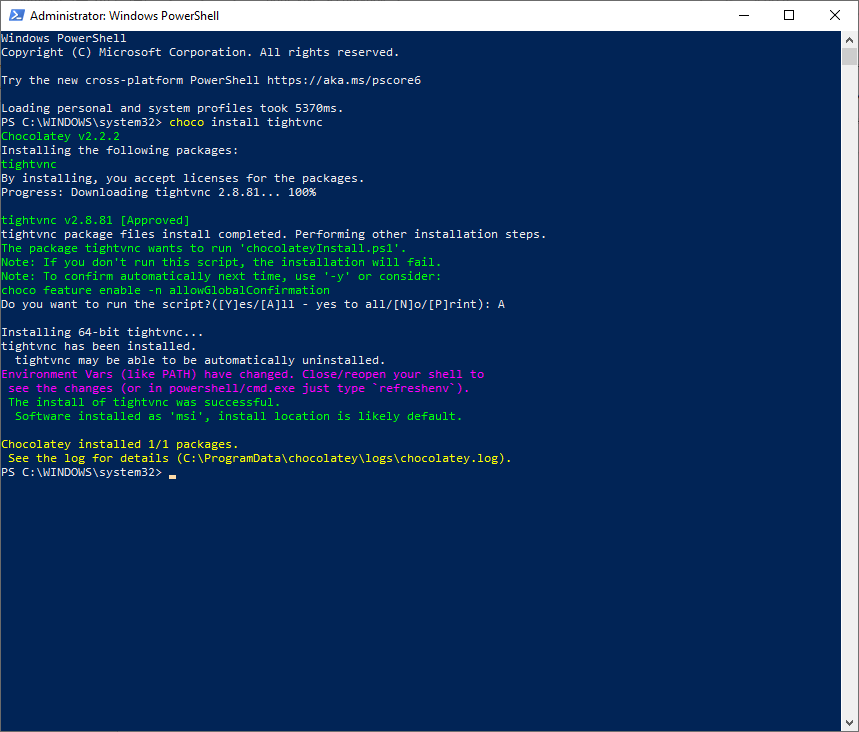
Now you can install Tight-vnc manually or via chocolatey. I used chocolatey and this from a public available repo.
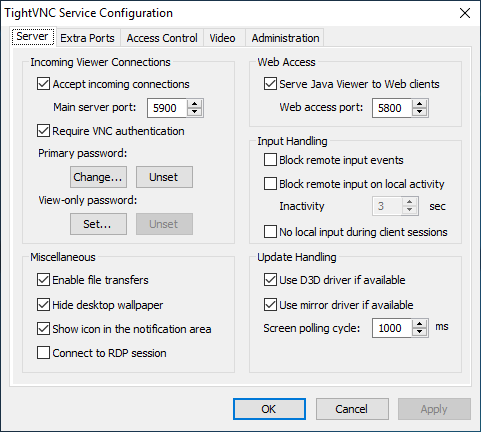
Now lets set the password by right clicking tightvnc icon in the bottom corner and setting the password to an 8 character password, by clicking on change primary password and typing in whatever you like
‘Suck3r00’
Now lets open powershell without administrator privileges. Lets say I got in remotely and chocolatey is there and I want to check to see if tight-vnc is there.
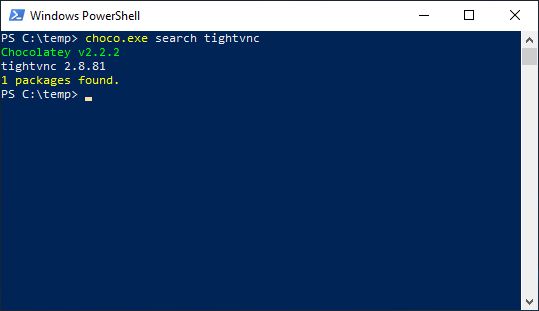
As you can see I find this without administrator privilege.
Now lets say I was able to view the registry and get the encrypted value for tight-vnc; all I need to do is see for a few seconds.
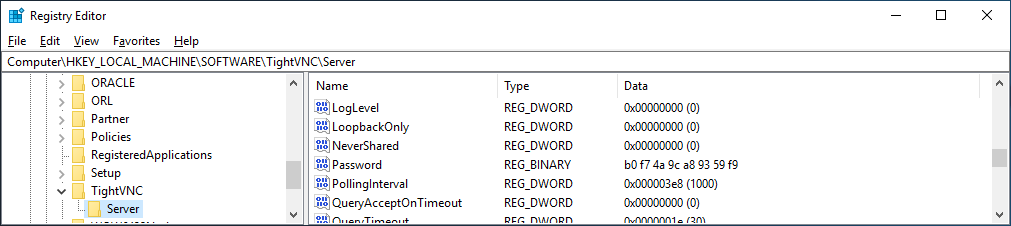
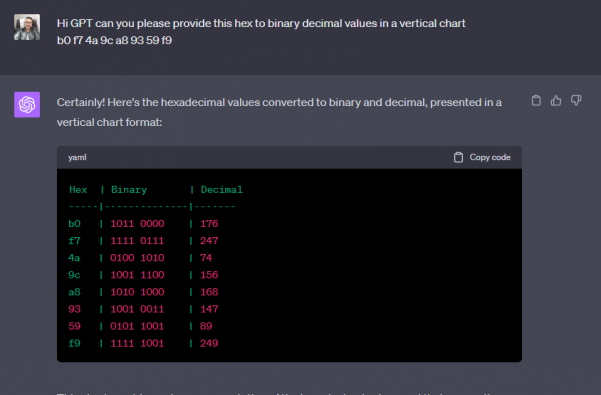
Now there are tools online where you can convert that hexadecimal to binary decimal values long before AI was around. But since I love GPT im going to ask it to convert that for me
I have script that didn’t take long to put together from digging around for about an hour online. Which im obviously not going to share, BUT if I can do it……someone with skills could do pretty easy. A professional hacker NO SWEAT.
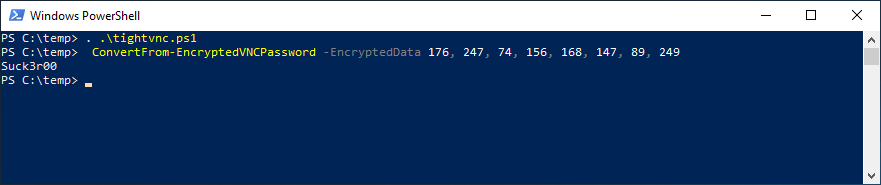
As you can see if you have rolled this out how dangerous it is.
Having said that I have also written an Ansible Role which will purge tightvnc from your infrastructure and deploy ultravnc which will use encryption and AD authentication. Which the other two currently do NOT do.
Hope you enjoyed getting P0WNed.
How to Create a Docker Image for Kubernetes to Deploy
1. What Is a Docker Image?
A Docker image is a read-only, portable template that contains everything required to run your application:
- Application code
- Dependencies and libraries
- Operating system base layer
- Runtime (Node, Python, Go, etc.)
- Startup command
Kubernetes uses these images to create containers inside Pods. Therefore, creating a clean, reliable Docker image is the foundation of a successful deployment.
2. Creating a Dockerfile
The first step is writing a Dockerfile. This defines how your application is built. Below is a simple example for a Node.js web application:
# Dockerfile

FROM node:18-alpine

WORKDIR /app

COPY package*.json ./
RUN npm install --omit=dev

COPY . .

EXPOSE 3000

CMD ["npm", "start"]
Explanation:
FROM node:18-alpinechooses a lightweight base image.WORKDIR /appsets the working directory.COPYandnpm installinstall dependencies.EXPOSE 3000informs Kubernetes which port the app listens on.CMDruns the application.
3. Building a Docker Image
Once your Dockerfile is ready, build the image:
docker build -t my-app:1.0.0 .
This creates an image called my-app with the version 1.0.0. It is good practice to use semantic versioning or Git commit hashes as tags.
4. Tagging the Image for Your Registry
To deploy to Kubernetes, your image must be stored in a registry such as:
- Docker Hub
- GitHub Container Registry
- Amazon ECR
- Google Artifact Registry
- Azure Container Registry
Tag the image with your registry path:
docker tag my-app:1.0.0 myregistry/my-app:1.0.0
5. Pushing the Image to the Registry
Push the image so Kubernetes can pull it:
docker push myregistry/my-app:1.0.0
At this point, your container image is globally accessible to your Kubernetes cluster.
6. Creating a Kubernetes Deployment
Once the image is in the registry, create a Kubernetes Deployment manifest to run the image. Below is a production-ready example:
apiVersion: apps/v1
kind: Deployment
metadata:
  name: my-app
  namespace: production
  labels:
    app: my-app
spec:
  replicas: 3
  revisionHistoryLimit: 5
  selector:
    matchLabels:
      app: my-app
  template:
    metadata:
      labels:
        app: my-app
    spec:
      securityContext:
        runAsNonRoot: true
        runAsUser: 1000
        fsGroup: 1000
      containers:
        - name: my-app
          image: myregistry/my-app:1.0.0
          ports:
            - containerPort: 3000
          resources:
            requests:
              cpu: "100m"
              memory: "128Mi"
            limits:
              cpu: "300m"
              memory: "256Mi"
          readinessProbe:
            httpGet:
              path: /
              port: 3000
            initialDelaySeconds: 5
            periodSeconds: 10
          livenessProbe:
            httpGet:
              path: /
              port: 3000
            initialDelaySeconds: 10
            periodSeconds: 20
          securityContext:
            readOnlyRootFilesystem: true
            allowPrivilegeEscalation: false
7. Applying the Deployment
To deploy your application:
kubectl apply -f deployment.yaml
Kubernetes will:
- Pull the image from the registry
- Create Pods
- Perform a rolling update if an older version exists
- Attach readiness and liveness probes
- Maintain the desired replica count
8. Verifying the Deployment
kubectl get deploy my-app -n production
kubectl get pods -n production -o wide
kubectl describe deploy my-app -n production
These commands will confirm that Kubernetes successfully rolled out your new Docker image.
How to Deploy KVM and Use Libvirt to Create VMs from the CLI
KVM (Kernel-based Virtual Machine) with libvirt is my go-to stack when I want proper virtualization on Linux without the overhead of full GUI tools. If you’re running servers, building a lab, or automating VM provisioning, doing it all through the command line is cleaner, faster, and easier to script.
This guide covers everything from installation to deploying and managing virtual machines entirely from the terminal.
- Installing KVM and libvirt
- Verifying hardware virtualization
- Setting up networking and storage pools
- Deploying VMs with
virt-install - Managing VMs via
virsh - Cloning and templating VMs
- Automating deployments with scripts
1. Install KVM and Libvirt
1.1 Check Virtualization Support
egrep -c '(vmx|svm)' /proc/cpuinfo
If the output is 1 or higher, your CPU supports hardware virtualization. Then confirm the kernel modules are loaded:
lsmod | grep kvm
1.2 Install on RHEL / Rocky / Alma
sudo dnf install -y \
  qemu-kvm \
  libvirt \
  libvirt-daemon \
  libvirt-daemon-driver-qemu \
  virt-install \
  virt-manager \
  bridge-utils
1.3 Install on Ubuntu / Debian
sudo apt update
sudo apt install -y \
  qemu-kvm \
  libvirt-daemon-system \
  libvirt-clients \
  virtinst \
  bridge-utils
1.4 Enable and Start Libvirt
sudo systemctl enable --now libvirtd
sudo systemctl status libvirtd
If the service is active, KVM and libvirt are ready to go.
2. Verify Setup
2.1 Check Capabilities
virsh capabilities
2.2 List VMs
virsh list --all
2.3 Check Default Network
virsh net-list --all
If the default network exists but isn’t active:
virsh net-start default
virsh net-autostart default
3. Networking Options
There are two main ways to handle networking with libvirt:
- Use the default NAT network (simpler)
- Create a Linux bridge for LAN access
3.1 Option A: Default NAT
Libvirt’s built-in NAT network works fine for most setups. VMs will have private IPs and access the internet via NAT through the host. Nothing to configure here.
3.2 Option B: Create a Linux Bridge
For VMs that need to sit directly on your LAN, create a bridge and attach the NIC to it.
Example (RHEL/Rocky/Alma):
# /etc/sysconfig/network-scripts/ifcfg-br0
DEVICE=br0
TYPE=Bridge
BOOTPROTO=dhcp
ONBOOT=yes
# /etc/sysconfig/network-scripts/ifcfg-eno1
DEVICE=eno1
TYPE=Ethernet
BOOTPROTO=none
ONBOOT=yes
BRIDGE=br0
sudo systemctl restart NetworkManager
You can define it in libvirt as well if you want it persistent:
virsh net-define br0.xml
virsh net-start br0
virsh net-autostart br0
4. Storage Pools and Volumes
4.1 Check Default Pool
virsh pool-list --all
virsh pool-start default
virsh pool-autostart default
4.2 Create a Custom Pool
sudo mkdir -p /vm_storage/images

virsh pool-define-as \
  vm_pool dir - - - - "/vm_storage/images"

virsh pool-start vm_pool
virsh pool-autostart vm_pool
4.3 Create a Disk Image
virsh vol-create-as vm_pool rocky8.qcow2 40G --format qcow2
5. Deploy VMs with virt-install
Example 1: Network Install (Rocky Linux)
virt-install \
  --name rocky8 \
  --ram 4096 \
  --vcpus 2 \
  --disk path=/vm_storage/images/rocky8.qcow2,size=40 \
  --os-variant=rocky8 \
  --network network=default \
  --graphics none \
  --location "https://dl.rockylinux.org/pub/rocky/8/BaseOS/x86_64/os/" \
  --extra-args="console=ttyS0,115200n8 serial"
Example 2: Install from ISO
virt-install \
  --name ubuntu-test \
  --ram 4096 \
  --vcpus 2 \
  --disk path=/vm_storage/images/ubuntu-test.qcow2,size=40 \
  --cdrom /isos/ubuntu-22.04.iso \
  --network network=default \
  --graphics vnc \
  --os-variant ubuntu22.04
Example 3: Cloud-Init Image
virt-install \
  --name cloud-ubuntu \
  --ram 2048 \
  --vcpus 2 \
  --disk /vm_storage/images/ubuntu-cloud.qcow2 \
  --cloud-init user-data=cloud-init.yaml \
  --network network=default \
  --os-variant ubuntu22.04 \
  --graphics none
6. Managing VMs with virsh
virsh start rocky8
virsh shutdown rocky8
virsh destroy rocky8   # Force stop
virsh autostart rocky8
virsh console rocky8
virsh list --all
To remove a VM completely:
virsh destroy rocky8
virsh undefine rocky8 --remove-all-storage
7. Managing Networks
Create a new NAT network manually:
<network>
  <name>mynet</name>
  <bridge name='virbr20'/>
  <forward mode='nat'/>
  <ip address='192.168.50.1' netmask='255.255.255.0'>
    <dhcp>
      <range start='192.168.50.10' end='192.168.50.100'/>
    </dhcp>
  </ip>
</network>
virsh net-define mynet.xml
virsh net-start mynet
virsh net-autostart mynet
8. Storage Volume Management
virsh vol-list vm_pool
virsh vol-resize /vm_storage/images/rocky8.qcow2 80G
9. Cloning and Templates
virt-sysprep -d rocky8
virt-clone --original rocky8 --name rocky8-clone --auto-clone
10. Automating Deployments
#!/bin/bash
VM=$1
DISK="/vm_storage/images/${VM}.qcow2"
ISO="/isos/rocky.iso"

virt-install \
  --name "$VM" \
  --ram 2048 \
  --vcpus 2 \
  --disk "$DISK",size=20 \
  --cdrom "$ISO" \
  --network network=default \
  --os-variant rocky8 \
  --graphics none \
  --extra-args="console=ttyS0"
Conclusion
KVM with libvirt gives you a complete virtualization stack that’s fast, stable, and fully automatable. Everything can be controlled from the command line ideal for headless servers, automation pipelines, and anyone who prefers to keep infrastructure clean and scriptable. Once you’re comfortable with virsh and virt-install, managing dozens of VMs becomes trivial; great open source solution.
How to Deploy VM’s in Hyper-V with Ansible
Thought it would be fun to do…..
If you can find another public repo that has it working online. Please send me a message so I can kick myself.
How to use this role: ansible-hyperv repo is set to private you must request access
Example file: hosts.dev, hosts.staging, hosts.prod
Note: If there is no group simply list the server outside grouping, the –limit flag will pick it
up.
Descriptions:
Operational Use:
Descriptions:
Operational Use:
passed parameters: example: inventory/host_vars/testmachine.nicktailor.com
vms:
– type: testserver
name: “nicktest“
cpu: 2
memory: 4096MB
network:
ip: 192.168.23.26
netmask: 255.255.255.0
gateway: 192.168.23.254
dns: 192.168.0.17,192.168.0.18
# network_switch: ‘External Virtual Switch’
network_switch: ‘Cisco VIC Ethernet Interface #6 – Virtual Switch’
vlanid: 1113
# source-image
src_vhd: ‘Z:\volumes\devops\devopssysprep\devopssysprep.vhdx‘
# destination will be created in Z:\\volumes\servername\servername.vhdx by default
# to change the paths you need to update the prov_vm.yml’s first three task paths
Running your playbook:
Example: of ansible/createvm.yml
—
– name: Provision VM
hosts: hypervdev.nicktailor.com
gather_facts: no
tasks:
– import_tasks: roles/ansible-hyperv/tasks/prov_vm.yml
Command:
ansible-playbook –i inventory/dev/hosts createvm.yml ––limit=’testmachine1.nicktailor.com‘
Successful example run of the book:
[ntailor@ansible-home ~]$ ansible-playbook –i inventory/hosts createvm.yml –limit=’testmachine1.nicktailor.com‘
PLAY [Provision VM] ****************************************************************************************************************************************************************
TASK [Create directory structure] **************************************************************************************************************************************************
ok: [testmachine1.nicktailor.com] => (item={‘type’: ‘testservers‘, ‘name’: ‘nicktest‘, ‘cpu‘: 2, ‘memory’: ‘4096MB’, ‘network’: {‘ip‘: ‘192.168.23.36’, ‘netmask’: ‘255.255.255.0’, ‘gateway’: ‘192.168.23.254’, ‘dns‘: ‘192.168.0.17,192.168.0.18‘}, ‘network_switch‘: ‘Cisco VIC Ethernet Interface #6 – Virtual Switch’, ‘vlanid‘: 1113, ‘src_vhd‘: ‘C:\\volumes\\devops\\devopssysprep\\devopssysprep.vhdx‘})
TASK [Check whether vhdx already exists] *******************************************************************************************************************************************
ok: [testmachine1.nicktailor.com] => (item={‘type’: ‘testservers‘, ‘name’: ‘nicktest‘, ‘cpu‘: 2, ‘memory’: ‘4096MB’, ‘network’: {‘ip‘: ‘192.168.23.36’, ‘netmask’: ‘255.255.255.0’, ‘gateway’: ‘192.168.23.254’, ‘dns‘: ‘192.168.0.17,192.168.0.18‘}, ‘network_switch‘: ‘Cisco VIC Ethernet Interface #6 – Virtual Switch’, ‘vlanid‘: 1113, ‘src_vhd‘: ‘C:\\volumes\\devops\\devopssysprep\\devopssysprep.vhdx‘})
TASK [Clone vhdx] ******************************************************************************************************************************************************************
changed: [testmachine1.nicktailor.com] => (item={‘changed’: False, ‘invocation’: {‘module_args‘: {‘path’: ‘Z:\\\\volumes\\\\devops\\nicktest\\nicktest.vhdx‘, ‘checksum_algorithm‘: ‘sha1’, ‘get_checksum‘: False, ‘follow’: False, ‘get_md5’: False}}, ‘stat’: {‘exists’: False}, ‘failed’: False, ‘item’: {‘type’: ‘testservers‘, ‘name’: ‘nicktest‘, ‘cpu‘: 2, ‘memory’: ‘4096MB’, ‘network’: {‘ip‘: ‘192.168.23.36’, ‘netmask’: ‘255.255.255.0’, ‘gateway’: ‘192.168.23.254’, ‘dns‘: ‘192.168.0.17,192.168.0.18‘}, ‘network_switch‘: ‘Cisco VIC Ethernet Interface #6 – Virtual Switch’, ‘vlanid‘: 1113, ‘src_vhd‘: ‘C:\\volumes\\devops\\devopssysprep\\devopssysprep.vhdx‘}, ‘ansible_loop_var‘: ‘item’})
TASK [set_fact] ********************************************************************************************************************************************************************
ok: [testmachine1.nicktailor.com]
TASK [debug] ***********************************************************************************************************************************************************************
ok: [testmachine1.nicktailor.com] => {
“path_folder“: “Z:\\\\volumes\\\\devops\\nicktest\\nicktest.vhdx”
}
TASK [set_fact] ********************************************************************************************************************************************************************
ok: [testmachine1.nicktailor.com]
TASK [debug] ***********************************************************************************************************************************************************************
ok: [testmachine1.nicktailor.com] => {
“page_folder“: “Z:\\\\volumes\\\\devops\\nicktest”
}
TASK [Create VMs] ******************************************************************************************************************************************************************
changed: [testmachine1.nicktailor.com] => (item={‘type’: ‘testservers‘, ‘name’: ‘nicktest‘, ‘cpu‘: 2, ‘memory’: ‘4096MB’, ‘network’: {‘ip‘: ‘192.168.23.36’, ‘netmask’: ‘255.255.255.0’, ‘gateway’: ‘192.168.23.254’, ‘dns‘: ‘192.168.0.17,192.168.0.18‘}, ‘network_switch‘: ‘Cisco VIC Ethernet Interface #6 – Virtual Switch’, ‘vlanid‘: 1113, ‘src_vhd‘: ‘C:\\volumes\\devops\\devopssysprep\\devopssysprep.vhdx‘})
TASK [Set SmartPaging File Location for new Virtual Machine to use destination image path] *****************************************************************************************
changed: [testmachine1.nicktailor.com] => (item={‘type’: ‘testservers‘, ‘name’: ‘nicktest‘, ‘cpu‘: 2, ‘memory’: ‘4096MB’, ‘network’: {‘ip‘: ‘192.168.23.36’, ‘netmask’: ‘255.255.255.0’, ‘gateway’: ‘192.168.23.254’, ‘dns‘: ‘192.168.0.17,192.168.0.18‘}, ‘network_switch‘: ‘Cisco VIC Ethernet Interface #6 – Virtual Switch’, ‘vlanid‘: 1113, ‘src_vhd‘: ‘C:\\volumes\\devops\\devopssysprep\\devopssysprep.vhdx‘})
TASK [Set Network VlanID] **********************************************************************************************************************************************************
changed: [testmachine1.nicktailor.com] => (item={‘type’: ‘testservers‘, ‘name’: ‘nicktest‘, ‘cpu‘: 2, ‘memory’: ‘4096MB’, ‘network’: {‘ip‘: ‘192.168.23.36’, ‘netmask’: ‘255.255.255.0’, ‘gateway’: ‘192.168.23.254’, ‘dns‘: ‘192.168.0.17,192.168.0.18‘}, ‘network_switch‘: ‘Cisco VIC Ethernet Interface #6 – Virtual Switch’, ‘vlanid‘: 1113, ‘src_vhd‘: ‘C:\\volumes\\devops\\devopssysprep\\devopssysprep.vhdx‘})
TASK [Configure VMs IP] ************************************************************************************************************************************************************
changed: [testmachine1.nicktailor.com] => (item={‘type’: ‘testservers‘, ‘name’: ‘nicktest‘, ‘cpu‘: 2, ‘memory’: ‘4096MB’, ‘network’: {‘ip‘: ‘192.168.23.36’, ‘netmask’: ‘255.255.255.0’, ‘gateway’: ‘192.168.23.254’, ‘dns‘: ‘192.168.0.17,192.168.0.18‘}, ‘network_switch‘: ‘Cisco VIC Ethernet Interface #6 – Virtual Switch’, ‘vlanid‘: 1113, ‘src_vhd‘: ‘C:\\volumes\\devops\\devopssysprep\\devopssysprep.vhdx‘})
TASK [add_host] ********************************************************************************************************************************************************************
changed: [testmachine1.nicktailor.com] => (item={‘changed’: True, ‘failed’: False, ‘item’: {‘type’: ‘testservers‘, ‘name’: ‘nicktest‘, ‘cpu‘: 2, ‘memory’: ‘4096MB’, ‘network’: {‘ip‘: ‘192.168.23.36’, ‘netmask’: ‘255.255.255.0’, ‘gateway’: ‘192.168.23.254’, ‘dns‘: ‘192.168.0.17,192.168.0.18‘}, ‘network_switch‘: ‘Cisco VIC Ethernet Interface #6 – Virtual Switch’, ‘vlanid‘: 1113, ‘src_vhd‘: ‘C:\\volumes\\devops\\devopssysprep\\devopssysprep.vhdx‘}, ‘ansible_loop_var‘: ‘item’})
TASK [Poweron VMs] *****************************************************************************************************************************************************************
changed: [testmachine1.nicktailor.com] => (item={‘type’: ‘testservers‘, ‘name’: ‘nicktest‘, ‘cpu‘: 2, ‘memory’: ‘4096MB’, ‘network’: {‘ip‘: ‘192.168.23.36’, ‘netmask’: ‘255.255.255.0’, ‘gateway’: ‘192.168.23.254’, ‘dns‘: ‘192.168.0.17,192.168.0.18‘}, ‘network_switch‘: ‘Cisco VIC Ethernet Interface #6 – Virtual Switch’, ‘vlanid‘: 1113, ‘src_vhd‘: ‘C:\\volumes\\devops\\devopssysprep\\devopssysprep.vhdx‘})
TASK [Wait for VM to be running] ***************************************************************************************************************************************************
ok: [testmachine1.nicktailor.com -> localhost] => (item={‘type’: ‘testservers‘, ‘name’: ‘nicktest‘, ‘cpu‘: 2, ‘memory’: ‘4096MB’, ‘network’: {‘ip‘: ‘192.168.23.36’, ‘netmask’: ‘255.255.255.0’, ‘gateway’: ‘192.168.23.254’, ‘dns‘: ‘192.168.0.17,192.168.0.18‘}, ‘network_switch‘: ‘Cisco VIC Ethernet Interface #6 – Virtual Switch’, ‘vlanid‘: 1113, ‘src_vhd‘: ‘C:\\volumes\\devops\\devopssysprep\\devopssysprep.vhdx‘})
TASK [debug] ***********************************************************************************************************************************************************************
ok: [testmachine1.nicktailor.com] => {
“wait”: {
“changed”: false,
“msg“: “All items completed”,
“results”: [
{
“ansible_loop_var“: “item”,
“changed”: false,
“elapsed”: 82,
“failed”: false,
“invocation”: {
“module_args“: {
“active_connection_states“: [
“ESTABLISHED”,
“FIN_WAIT1”,
“FIN_WAIT2”,
“SYN_RECV”,
“SYN_SENT”,
“TIME_WAIT”
],
“connect_timeout“: 5,
“delay”: 0,
“exclude_hosts“: null,
“host”: “192.168.23.36”,
“msg“: null,
“path”: null,
“port”: 5986,
“search_regex“: null,
“sleep”: 1,
“state”: “started”,
“timeout”: 100
}
},
“item”: {
“cpu“: 2,
“memory”: “4096MB”,
“name”: “nicktest“,
“network”: {
“dns“: “192.168.0.17,192.168.0.18“,
“gateway”: “192.168.23.254”,
“ip“: “192.168.23.36”,
“netmask”: “255.255.255.0”
},
“network_switch“: “Cisco VIC Ethernet Interface #6 – Virtual Switch”,
“src_vhd“: “C:\\volumes\\devops\\devopssysprep\\devopssysprep.vhdx”,
“type”: “testservers“,
“vlanid“: 1113
},
“match_groupdict“: {},
“match_groups“: [],
“path”: null,
“port”: 5986,
“search_regex“: null,
“state”: “started”
}
]
}
}
PLAY RECAP *************************************************************************************************************************************************************************
testmachine1.nicktailor.com : ok=15 changed=7 unreachable=0 failed=0 skipped=0 rescued=0 ignored=0
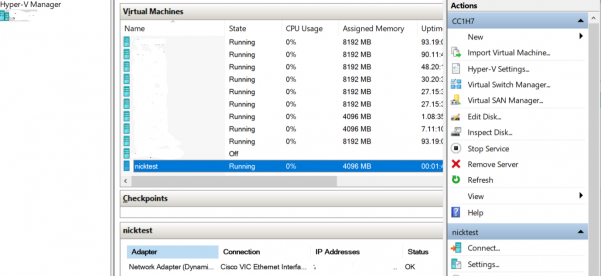
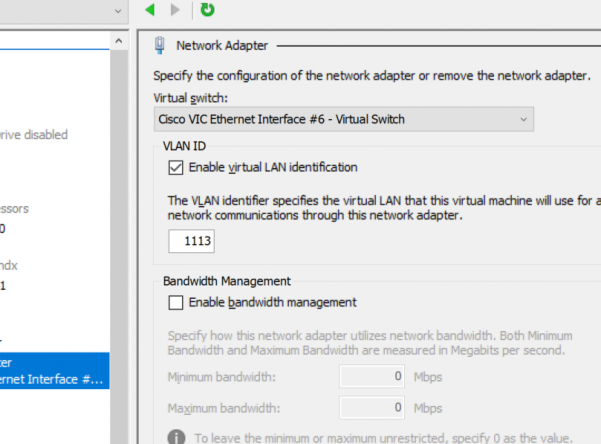
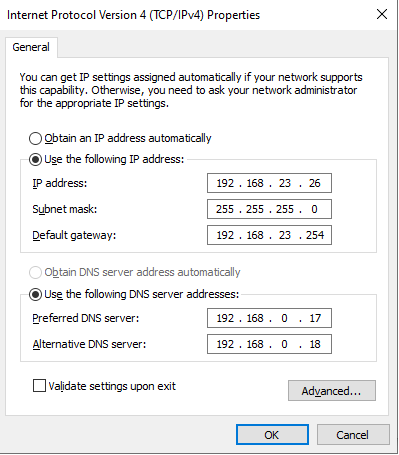
How to Configure Redhat 7 & 8 Network Interfaces using Ansible
(bonded nics, gateways, routes, interface names)
How to use this role:
Example file: hosts.dev, hosts.staging, hosts.prod
Cool Stuff: If you deployed a virtual-machine using the ansible-vmware modules it will set the hostname of the host using the same shortname of the vm. If you require the fqdn vs the shortname on the host. To solve this I added some code to set the fdqn as the new_hostname if you define it under you hosts.file as shown below.
Now inside this directory you should see hosts & host_vars, group_vars
Descriptions:
Operational Use:
Descriptions:
Operational Use:
passed parameters: example: var/testmachine1
#Configure network can be used on physical and virtual-machines
nic_devices:
– device: ens192
ip: 192.168.10.100
nm: 255.255.255.0
gw: 192.168.10.254
uuid:
mac:
Note: you do not need to specify the UUID, you can if you wish. You do need the MAC. if you are doing bonded nics on the hosts. If you are using physical machines with satellite deployments. Then its probably a good to idea to use the mac of the nic you want the dhcp request to hit to avoid accidently deploying to the wrong host. When dealing with physical machines you don’t really have the same forgiveness of snapshots or quickly rebuilding as a vm. You can do more complicated configurations as indicated below….You can always email or contact me via linkedin, top right of the blog if you need assistance.
More Advanced configurations: bonded nics, routes, multiple nics and gateways
bond_devices:
– device: ens1
mac: ec:0d:9a:05:3b:f0
master: mgt
eth_opts: ‘-C ${DEVICE} adaptive-rx off rx-usecs 0 rx-frames 0; -K ${DEVICE} lro off’
– device: ens1d1
mac: ec:0d:9a:05:3b:f1
master: mgt
eth_opts: ‘-C ${DEVICE} adaptive-rx off rx-usecs 0 rx-frames 0; -K ${DEVICE} lro off’
– device: mgt
ip: 10.100.1.2
nm: 255.255.255.0
gw: 10.100.1.254
pr: ens1
– device: ens6
mac: ec:0d:9a:05:16:g0
master: app
– device: ens6d1
mac: ec:0d:9a:05:16:g1
master: app
– device: app
ip: 10.101.1.3
nm: 255.255.255.0
pr: ens6
routes:
– device: app
route:
– 100.240.136.0/24
– 100.240.138.0/24
– device: app
gw: 10.156.177.1
route:
– 10.156.148.0/24
Running your playbook:
Example: of ansible/ setup-networkonly.yml
– hosts: all
gather_facts: no
roles:
– role: setup-redhat-interfaces
Command:
ansible-playbook -i inventory/dev/hosts setup-networkonly.yml–limit=’testmachine1.nicktailor.com’
Test Run:
[root@ansible-home]# ansible-playbook –i inventory/dev/hosts setup-metworkonly.yml –limit=’testmachine1.nicktailor.com’ -k
SSH password:
PLAY [all] *************************************************************************************************************************************************************************
TASK [setup-redhat-network : Gather facts] ************************************************************************************************************************************
ok: [testmachine1.nicktailor.com]
TASK [setup-redhat-network : set_fact] ****************************************************************************************************************************************
ok: [testmachine1.nicktailor.com]
TASK [setup-redhat-network : Cleanup network confguration] ********************************************************************************************************************
ok: [testmachine1.nicktailor.com]
TASK [setup-redhat-network : find] ********************************************************************************************************************************************
ok: [testmachine1.nicktailor.com]
TASK [setup-redhat-network : file] ********************************************************************************************************************************************
changed: [testmachine1.nicktailor.com] => (item={u’rusr‘: True, u’uid‘: 0, u’rgrp‘: True, u’xoth‘: False, u’islnk‘: False, u’woth‘: False, u’nlink‘: 1, u’issock‘: False, u’mtime‘: 1530272815.953706, u’gr_name‘: u’root‘, u’path‘: u’/etc/sysconfig/network-scripts/ifcfg-enp0s3′, u’xusr‘: False, u’atime‘: 1665494779.63, u’inode‘: 1055173, u’isgid‘: False, u’size‘: 285, u’isdir‘: False, u’ctime‘: 1530272816.3037066, u’isblk‘: False, u’wgrp‘: False, u’xgrp‘: False, u’isuid‘: False, u’dev‘: 64769, u’roth‘: True, u’isreg‘: True, u’isfifo‘: False, u’mode‘: u’0644′, u’pw_name‘: u’root‘, u’gid‘: 0, u’ischr‘: False, u’wusr‘: True})
changed: [testmachine1.nicktailor.com] => (item={u’rusr‘: True, u’uid‘: 0, u’rgrp‘: True, u’xoth‘: False, u’islnk‘: False, u’woth‘: False, u’nlink‘: 1, u’issock‘: False, u’mtime‘: 1530272848.538762, u’gr_name‘: u’root‘, u’path‘: u’/etc/sysconfig/network-scripts/ifcfg-enp0s8′, u’xusr‘: False, u’atime‘: 1665494779.846, u’inode‘: 2769059, u’isgid‘: False, u’size‘: 203, u’isdir‘: False, u’ctime‘: 1530272848.6417623, u’isblk‘: False, u’wgrp‘: False, u’xgrp‘: False, u’isuid‘: False, u’dev‘: 64769, u’roth‘: True, u’isreg‘: True, u’isfifo‘: False, u’mode‘: u’0644′, u’pw_name‘: u’root‘, u’gid‘: 0, u’ischr‘: False, u’wusr‘: True})
TASK [setup-redhat-network : file] ********************************************************************************************************************************************
ok: [testmachine1.nicktailor.com]
TASK [setup-redhat-network : Setup bond devices] ******************************************************************************************************************************
changed: [testmachine1.nicktailor.com] => (item={u’device‘: u’enp0s8′, u’mac‘: u’08:00:27:13:b2:73′, u’master‘: u’mgt‘})
changed: [testmachine1.nicktailor.com] => (item={u’device‘: u’enp0s9′, u’mac‘: u’08:00:27:e8:cf:cd’, u’master‘: u’mgt‘})
changed: [testmachine1.nicktailor.com] => (item={u’device‘: u’mgt‘, u’ip‘: u’192.168.10.200‘, u’nm‘: u’255.255.255.0′, u’gw‘: u’10.0.2.2′, u’pr‘: u’enp0s8′})
TASK [setup-redhat-network : Setup NIC] ***************************************************************************************************************************************
TASK [setup-redhat-network : Setup static routes] *****************************************************************************************************************************
PLAY RECAP *************************************************************************************************************************************************************************
testmachine1.nicktailor.com : ok=7 changed=2 unreachable=0 failed=0 skipped=2 rescued=0 ignored=0
[root@testmachine1.nicktailor.com]# cat /proc/net/bonding/mgt
Ethernet Channel Bonding Driver: v3.7.1 (April 27, 2011)
Bonding Mode: fault-tolerance (active-backup)
Primary Slave: enp0s8 (primary_reselect failure)
Currently Active Slave: enp0s8
MII Status: up
MII Polling Interval (ms): 100
Up Delay (ms): 0
Down Delay (ms): 0
Slave Interface: enp0s8
MII Status: up
Speed: 1000 Mbps
Duplex: full
Link Failure Count: 0
Permanent HW addr: 08:00:27:13:b2:73
Slave queue ID: 0
Slave Interface: enp0s9
MII Status: up
Speed: 1000 Mbps
Duplex: full
Link Failure Count: 0
Permanent HW addr: 08:00:27:e8:cf:cd
Slave queue ID: 0
[root@testmachine1.nicktailor.com]# ip a
1: lo: <LOOPBACK,UP,LOWER_UP> mtu 65536 qdisc noqueue state UNKNOWN group default qlen 1000
link/loopback 00:00:00:00:00:00 brd 00:00:00:00:00:00
inet 127.0.0.1/8 scope host lo
valid_lft forever preferred_lft forever
inet6 ::1/128 scope host
valid_lft forever preferred_lft forever
2: enp0s3: <BROADCAST,MULTICAST,UP,LOWER_UP> mtu 1500 qdisc pfifo_fast state UP group default qlen 1000
link/ether 08:00:27:63:63:0e brd ff:ff:ff:ff:ff:ff
inet 10.0.2.15/24 brd 10.0.2.255 scope global noprefixroute dynamic enp0s3
valid_lft 86074sec preferred_lft 86074sec
inet6 fe80::a162:1b49:98b7:6c54/64 scope link noprefixroute
valid_lft forever preferred_lft forever
3: enp0s8: <BROADCAST,MULTICAST,SLAVE,UP,LOWER_UP> mtu 1500 qdisc pfifo_fast master mgt state UP group default qlen 1000
link/ether 08:00:27:13:b2:73 brd ff:ff:ff:ff:ff:ff
4: enp0s9: <BROADCAST,MULTICAST,SLAVE,UP,LOWER_UP> mtu 1500 qdisc pfifo_fast master mgt state UP group default qlen 1000
link/ether 08:00:27:13:b2:73 brd ff:ff:ff:ff:ff:ff
5: enp0s10: <BROADCAST,MULTICAST,UP,LOWER_UP> mtu 1500 qdisc pfifo_fast state UP group default qlen 1000
link/ether 08:00:27:05:b4:e8 brd ff:ff:ff:ff:ff:ff
6: bond0: <BROADCAST,MULTICAST,MASTER> mtu 1500 qdisc noop state DOWN group default qlen 1000
link/ether ae:db:dc:52:22:f8 brd ff:ff:ff:ff:ff:ff
7: mgt: <BROADCAST,MULTICAST,MASTER,UP,LOWER_UP> mtu 1500 qdisc noqueue state UP group default qlen 1000
link/ether 08:00:27:13:b2:73 brd ff:ff:ff:ff:ff:ff
inet 192.168.10.200/24 brd 192.168.56.255 scope global mgt
valid_lft forever preferred_lft forever
inet6 fe80::a00:27ff:fe13:b273/64 scope link
valid_lft forever preferred_lft forever
How to Join Windows Servers to your DC with Ansible
How to use this role:
Example file: hosts.dev, hosts.staging, hosts.prod
Note: If there is no group simply list the server outside grouping, the –limit flag will pick it
up.
Descriptions:
Operational Use:
Descriptions:
Operational Use:
passed parameters: example: roles/add-server-to-dc/default/main.yml
dns_domain_name: ad.nicktailor.com
computer_name: testmachine1
domain_ou_path: “OU=Admin,DC=nicktailor,DC=local”
domain_admin_user: adminuser@nicktailor.com
state: domain
Running your playbook:
Example: of ansible/joinservertodomain.yml
– hosts: all
gather_facts: no
vars_prompt:
– name: domain_pass
prompt: Enter Admin Domain Password
roles:
– role: add–servers-to–dc
Command:
ansible-playbook –i inventory/dev/hosts joinservertodomain.yml ––limit=’testmachine1.nicktailor.com‘
Successful example run of the book:
[alfred@ansible.nicktailor.com ~]$ ansible-playbook –i inventory/hosts joinservertodomain.yml –limit=’testmachine1.nicktailor.com‘
ansible-playbook 2.9.27
config file = /etc/ansible/ansible.cfg
configured module search path = [‘/home/alfred/.ansible/plugins/modules’, ‘/usr/share/ansible/plugins/modules’]
ansible python module location = /usr/lib/python3.6/site-packages/ansible
executable location = /usr/bin/ansible-playbook
python version = 3.6.8 (default, Nov 10 2021, 06:50:23) [GCC 8.5.0 20210514 (Red Hat 8.5.0-3.0.2)]
PLAYBOOK: joinservertodomain.yml *****************************************************************************************************************************************************
Positional arguments: joinservertodomain.yml
verbosity: 4
connection: smart
timeout: 10
become_method: sudo
tags: (‘all’,)
inventory: (‘/home/alfred/inventory/hosts’,)
subset: testmachine1.nicktailor.com
forks: 5
1 plays in joinservertodomain.yml
Enter Domain Password:
PLAY [all] ***********************************************************************************************************************************************************************
META: ran handlers
TASK [addservertodc : Join windows host to Domain Controller] ********************************************************************************************************************
task path: /home/alfred/roles/addservertodc/tasks/main.yml:1
Using module file /usr/lib/python3.6/site-packages/ansible/modules/windows/win_domain_membership.ps1
Pipelining is enabled.
<testmachine1.nicktailor.com> ESTABLISH WINRM CONNECTION FOR USER: ansibleuser on PORT 5986 TO testmachine1.nicktailor.com
EXEC (via pipeline wrapper)
changed: [testmachine1.nicktailor.com] => {
“changed”: true,
“reboot_required“: true
}
TASK [addservertodc : win_reboot] ************************************************************************************************************************************************
win_reboot: system successfully rebooted
changed: [testmachine1.nicktailor.com] => {
“changed”: true,
“elapsed”: 23,
“rebooted”: true
}
META: ran handlers
META: ran handlers
PLAY RECAP ***********************************************************************************************************************************************************************
testmachine1.nicktailor.com : ok=2 changed=2 unreachable=0 failed=0 skipped=0 rescued=0 ignored=0
How to deploy OpenNebula Frontends via Ansible
Frontend: This role deploys the OpenNebula Cloud platform frontends via Ansible
Ansible Operational Documentation – OpenNebula Frontend Deployments
https://opennebula.io/ – OpenNebula is basically a opensource inhouse cloud platform that you can deploy and manage virtual machines using a kvm backend on the host which is scalable. OpenNebula support give you a document to run manual commands, and would not provide the opensource playbook they use to deploy frontends.
So I reverse engineered one for others to use and edit as needed. As nobody runs commands manually anymore. If you are not automating then you are basically a dinosaur
Note: You will still need to buy your own enterprise license to get access to the apt source. You can find that below and you can plug those into defaults/main.yml before you run the book.
This role handles the following when deploying OpenNebula Frontends in standalone or HA using groups to distinguish how to deploy in scale using apache.
How to use this role:
Example file: hosts.opennebula
Example: This is how you would list out 3 frontend hosts
[all:children]
frontend_server_primary # this is where you list ON server number 1
mysql_servers – you list any server that will require mysql install for ON
apache_servers – you list any server that will be running ON apache
frontend_HA – you list any additional front ends that will be used in HA here for OpenNebula
[frontend_server_primary]
Testmachine1 ansible_host=192.168.86.61
[mysql_servers]
Testmachine1 ansible_host=192.168.86.61
Testmachine2 ansible_host=192.168.86.62
#Testmachine3 ansibel_host=192.168.86.63
[apache_servers]
Testmachine1 ansible_host=192.168.86.61
Testmachine2 ansible_host=192.168.86.62
#Testmachine3 ansibel_host=192.168.86.63
[frontend_HA]
Testmachine2 ansible_host=192.168.86.62
#Testmachine3 ansible_host=192.168.86.63
Note: For a standalone setup you simply list the same host under the following 3 groups listed below and then in your command under –limt=”testmachine1” instead of ‘testmachine1,testmachine2′. The playbook is smart enough to know what to do from there.
[frontend_server_primary]
Testmachine1 ansible_host=192.168.86.63
[mysql_servers]
Testmachine1 ansible_host=192.168.86.63
[apache_servers]
Testmachine1 ansible_host=192.168.86.63
Special Notes: This playbook is designed so you can choose deploy ON in standalone, in classic centralised mysql(HA), or OpenNebula HA(with mysql deploy individually with rafthook configuration.
We will be deploying the OpenNebula officially supported way.
Although no senior architect would usually choose this approach over classic mysql HA(active/passive), we followed it anyway.
Important things to know:
Group variables for this role that are passed and need to be defined below. If you want to change certificates and configure mysql it has to be done in these group vars for this role to work. You will need to create opennebula ssl keys for the vnc console stuff to work, they are not provided by this playbook.
Dev/group_vars:
session_memcache: memcache
vnc_proxy_support_wss: true
vnc_proxy_cert_path: /etc/ssl/certs/opennebula.pem
vnc_proxy_key_path: /etc/ssl/private/opennebula.key
vnc_proxy_ipv6: false
vnc_request_password: false
driver: qcow2
#If these are defined HA setup is pushed.
#It Adds VIP hooks for floating IP and federation server ID:
#these variables can be overidden at at the host_var level.
#If host is listed under frontend_HA group in your host
#then these defaults will be used
leader_interface_name: enp0s8
leader_ip: 192.168.50.132/24
follower_ip: 192.168.50.132/24
follower_interface_name: enp0s8
Mysql_servers
OpenNebula Mysql Installation
mysqlrootuser: root
mysqlnewinstallpassword: Swordfish123
mysql_admin_user: admin
mysql_admin_password: admin
database_to_create: opennebula
Running your playbook:
Example: of opennebula-frontend/ON-frontenddeploy.yml
– hosts: all
become: True
become_user: root
gather_facts: no
roles:
– role: opennebula-frontend
Command: Running – playbook to deploy OpenNebula in HA
ansible-playbook -i inventory/dev/hosts ON-frontenddeploy.yml -u brucewayne -Kkb –ask-become –limit=’testmachine1,testmachine2′
Command: Running – playbook to deploy OpenNebula in Standalone
ansible-playbook -i inventory/dev/hosts ON-frontenddeploy.yml -u brucewayne -Kkb –ask-become –limit=’testmachine1′
Successful run:
brucewayne@KVM–test–box:~/ansible/opennebula-frontend$ ansible–playbook –i inventory/dev/hosts.opennebula2 ON–frontenddeploy.yml –u brucewayne –Kkb —ask–become —limit=‘testmachine1,testmachine2’
SSH password:
BECOME password[defaults to SSH password]:
PLAY [all] ***************************************************************************************************************************************************************************************************************
TASK [frontend : install debian packages] ********************************************************************************************************************************************************************************
ok: [testmachine2] => (item=curl)
ok: [testmachine1] => (item=curl)
ok: [testmachine1] => (item=gnupg)
ok: [testmachine2] => (item=gnupg)
changed: [testmachine1] => (item=build–essential)
ok: [testmachine1] => (item=dirmngr)
ok: [testmachine1] => (item=ca–certificates)
ok: [testmachine1] => (item=memcached)
changed: [testmachine2] => (item=build–essential)
ok: [testmachine2] => (item=dirmngr)
ok: [testmachine2] => (item=ca–certificates)
ok: [testmachine2] => (item=memcached)
TASK [frontend : import the opennebula apt key] **************************************************************************************************************************************************************************
changed: [testmachine2]
changed: [testmachine1]
TASK [frontend : Show Key list] ******************************************************************************************************************************************************************************************
changed: [testmachine1]
changed: [testmachine2]
TASK [frontend : debug] **************************************************************************************************************************************************************************************************
ok: [testmachine1] => {
“keylist.stdout_lines”: [
“/etc/apt/trusted.gpg”,
“——————–“,
“pub rsa2048 2013-06-13 [SC]”,
” 92B7 7188 854C F23E 1634 DA89 592F 7F05 85E1 6EBF”,
“uid [ unknown] OpenNebula Repository <contact@opennebula.org>”,
“sub rsa2048 2013-06-13 [E]”,
“”,
“/etc/apt/trusted.gpg.d/ubuntu-keyring-2012-archive.gpg”,
“——————————————————“,
“pub rsa4096 2012-05-11 [SC]”,
” 790B C727 7767 219C 42C8 6F93 3B4F E6AC C0B2 1F32″,
“uid [ unknown] Ubuntu Archive Automatic Signing Key (2012) <ftpmaster@ubuntu.com>”,
“”,
“/etc/apt/trusted.gpg.d/ubuntu-keyring-2012-cdimage.gpg”,
“——————————————————“,
“pub rsa4096 2012-05-11 [SC]”,
” 8439 38DF 228D 22F7 B374 2BC0 D94A A3F0 EFE2 1092″,
“uid [ unknown] Ubuntu CD Image Automatic Signing Key (2012) <cdimage@ubuntu.com>”,
“”,
“/etc/apt/trusted.gpg.d/ubuntu-keyring-2018-archive.gpg”,
“——————————————————“,
“pub rsa4096 2018-09-17 [SC]”,
” F6EC B376 2474 EDA9 D21B 7022 8719 20D1 991B C93C”,
“uid [ unknown] Ubuntu Archive Automatic Signing Key (2018) <ftpmaster@ubuntu.com>”
]
}
ok: [testmachine2] => {
“keylist.stdout_lines”: [
“/etc/apt/trusted.gpg”,
“——————–“,
“pub rsa2048 2013-06-13 [SC]”,
” 92B7 7188 854C F23E 1634 DA89 592F 7F05 85E1 6EBF”,
“uid [ unknown] OpenNebula Repository <contact@opennebula.org>”,
“sub rsa2048 2013-06-13 [E]”,
“”,
“/etc/apt/trusted.gpg.d/ubuntu-keyring-2012-archive.gpg”,
“——————————————————“,
“pub rsa4096 2012-05-11 [SC]”,
” 790B C727 7767 219C 42C8 6F93 3B4F E6AC C0B2 1F32″,
“uid [ unknown] Ubuntu Archive Automatic Signing Key (2012) <ftpmaster@ubuntu.com>”,
“”,
“/etc/apt/trusted.gpg.d/ubuntu-keyring-2012-cdimage.gpg”,
“——————————————————“,
“pub rsa4096 2012-05-11 [SC]”,
” 8439 38DF 228D 22F7 B374 2BC0 D94A A3F0 EFE2 1092″,
“uid [ unknown] Ubuntu CD Image Automatic Signing Key (2012) <cdimage@ubuntu.com>”,
“”,
“/etc/apt/trusted.gpg.d/ubuntu-keyring-2018-archive.gpg”,
“——————————————————“,
“pub rsa4096 2018-09-17 [SC]”,
” F6EC B376 2474 EDA9 D21B 7022 8719 20D1 991B C93C”,
“uid [ unknown] Ubuntu Archive Automatic Signing Key (2018) <ftpmaster@ubuntu.com>”
]
}
TASK [frontend : import the phusionpassenger apt key] ********************************************************************************************************************************************************************
changed: [testmachine2]
changed: [testmachine1]
TASK [frontend : Show Key list] ******************************************************************************************************************************************************************************************
changed: [testmachine1]
changed: [testmachine2]
TASK [frontend : debug] **************************************************************************************************************************************************************************************************
ok: [testmachine1] => {
“keylist2.stdout_lines”: [
“/etc/apt/trusted.gpg”,
“——————–“,
“pub rsa2048 2013-06-13 [SC]”,
” 92B7 7188 854C F23E 1634 DA89 592F 7F05 85E1 6EBF”,
“uid [ unknown] OpenNebula Repository <contact@opennebula.org>”,
“sub rsa2048 2013-06-13 [E]”,
“”,
“pub rsa4096 2013-06-30 [SC]”,
” 1637 8A33 A6EF 1676 2922 526E 561F 9B9C AC40 B2F7″,
“uid [ unknown] Phusion Automated Software Signing (Used by automated tools to sign software packages) <auto-software-signing@phusion.nl>”,
“sub rsa4096 2013-06-30 [E]”,
“”,
“/etc/apt/trusted.gpg.d/ubuntu-keyring-2012-archive.gpg”,
“——————————————————“,
“pub rsa4096 2012-05-11 [SC]”,
” 790B C727 7767 219C 42C8 6F93 3B4F E6AC C0B2 1F32″,
“uid [ unknown] Ubuntu Archive Automatic Signing Key (2012) <ftpmaster@ubuntu.com>”,
“”,
“/etc/apt/trusted.gpg.d/ubuntu-keyring-2012-cdimage.gpg”,
“——————————————————“,
“pub rsa4096 2012-05-11 [SC]”,
” 8439 38DF 228D 22F7 B374 2BC0 D94A A3F0 EFE2 1092″,
“uid [ unknown] Ubuntu CD Image Automatic Signing Key (2012) <cdimage@ubuntu.com>”,
“”,
“/etc/apt/trusted.gpg.d/ubuntu-keyring-2018-archive.gpg”,
“——————————————————“,
“pub rsa4096 2018-09-17 [SC]”,
” F6EC B376 2474 EDA9 D21B 7022 8719 20D1 991B C93C”,
“uid [ unknown] Ubuntu Archive Automatic Signing Key (2018) <ftpmaster@ubuntu.com>”
]
}
ok: [testmachine2] => {
“keylist2.stdout_lines”: [
“/etc/apt/trusted.gpg”,
“——————–“,
“pub rsa2048 2013-06-13 [SC]”,
” 92B7 7188 854C F23E 1634 DA89 592F 7F05 85E1 6EBF”,
“uid [ unknown] OpenNebula Repository <contact@opennebula.org>”,
“sub rsa2048 2013-06-13 [E]”,
“”,
“pub rsa4096 2013-06-30 [SC]”,
” 1637 8A33 A6EF 1676 2922 526E 561F 9B9C AC40 B2F7″,
“uid [ unknown] Phusion Automated Software Signing (Used by automated tools to sign software packages) <auto-software-signing@phusion.nl>”,
“sub rsa4096 2013-06-30 [E]”,
“”,
“/etc/apt/trusted.gpg.d/ubuntu-keyring-2012-archive.gpg”,
“——————————————————“,
“pub rsa4096 2012-05-11 [SC]”,
” 790B C727 7767 219C 42C8 6F93 3B4F E6AC C0B2 1F32″,
“uid [ unknown] Ubuntu Archive Automatic Signing Key (2012) <ftpmaster@ubuntu.com>”,
“”,
“/etc/apt/trusted.gpg.d/ubuntu-keyring-2012-cdimage.gpg”,
“——————————————————“,
“pub rsa4096 2012-05-11 [SC]”,
” 8439 38DF 228D 22F7 B374 2BC0 D94A A3F0 EFE2 1092″,
“uid [ unknown] Ubuntu CD Image Automatic Signing Key (2012) <cdimage@ubuntu.com>”,
“”,
“/etc/apt/trusted.gpg.d/ubuntu-keyring-2018-archive.gpg”,
“——————————————————“,
“pub rsa4096 2018-09-17 [SC]”,
” F6EC B376 2474 EDA9 D21B 7022 8719 20D1 991B C93C”,
“uid [ unknown] Ubuntu Archive Automatic Signing Key (2018) <ftpmaster@ubuntu.com>”
]
}
TASK [frontend : add opennebula apt repository] **************************************************************************************************************************************************************************
changed: [testmachine1]
changed: [testmachine2]
TASK [frontend : add bionic phusionpassenger apt repository] *************************************************************************************************************************************************************
changed: [testmachine1]
changed: [testmachine2]
TASK [frontend : wget apt–transport–https ca–certificates] ***************************************************************************************************************************************************************
changed: [testmachine1]
changed: [testmachine2]
TASK [frontend : debug] **************************************************************************************************************************************************************************************************
ok: [testmachine1] => {
“install2”: {
“changed”: true,
“cmd”: “apt-get -y install wget apt-transport-https ca-certificates”,
“delta”: “0:00:02.087119”,
“end”: “2022-04-06 03:13:42.512860”,
“failed”: false,
“msg”: “”,
“rc”: 0,
“start”: “2022-04-06 03:13:40.425741”,
“stderr”: “”,
“stderr_lines”: [],
“stdout”: “Reading package lists…\nBuilding dependency tree…\nReading state information…\nca-certificates is already the newest version (20210119~20.04.2).\nwget is already the newest version (1.20.3-1ubuntu2).\nwget set to manually installed.\nThe following NEW packages will be installed\n apt-transport-https\n0 to upgrade, 1 to newly install, 0 to remove and 1 not to upgrade.\nNeed to get 4,680 B of archives.\nAfter this operation, 162 kB of additional disk space will be used.\nGet:1 http://gb.archive.ubuntu.com/ubuntu focal-updates/universe amd64 apt-transport-https all 2.0.6 [4,680 B]\nFetched 4,680 B in 0s (15.1 kB/s)\nSelecting previously unselected package apt-transport-https.\r\n(Reading database … \r(Reading database … 5%\r(Reading database … 10%\r(Reading database … 15%\r(Reading database … 20%\r(Reading database … 25%\r(Reading database … 30%\r(Reading database … 35%\r(Reading database … 40%\r(Reading database … 45%\r(Reading database … 50%\r(Reading database … 55%\r(Reading database … 60%\r(Reading database … 65%\r(Reading database … 70%\r(Reading database … 75%\r(Reading database … 80%\r(Reading database … 85%\r(Reading database … 90%\r(Reading database … 95%\r(Reading database … 100%\r(Reading database … 199304 files and directories currently installed.)\r\nPreparing to unpack …/apt-transport-https_2.0.6_all.deb …\r\nUnpacking apt-transport-https (2.0.6) …\r\nSetting up apt-transport-https (2.0.6) …”,
“stdout_lines”: [
“Reading package lists…”,
“Building dependency tree…”,
“Reading state information…”,
“ca-certificates is already the newest version (20210119~20.04.2).”,
“wget is already the newest version (1.20.3-1ubuntu2).”,
“wget set to manually installed.”,
“The following NEW packages will be installed”,
” apt-transport-https”,
“0 to upgrade, 1 to newly install, 0 to remove and 1 not to upgrade.”,
“Need to get 4,680 B of archives.”,
“After this operation, 162 kB of additional disk space will be used.”,
“Get:1 http://gb.archive.ubuntu.com/ubuntu focal-updates/universe amd64 apt-transport-https all 2.0.6 [4,680 B]”,
“Fetched 4,680 B in 0s (15.1 kB/s)”,
“Selecting previously unselected package apt-transport-https.”,
“(Reading database … “,
“(Reading database … 5%”,
“(Reading database … 10%”,
“(Reading database … 15%”,
“(Reading database … 20%”,
“(Reading database … 25%”,
“(Reading database … 30%”,
“(Reading database … 35%”,
“(Reading database … 40%”,
“(Reading database … 45%”,
“(Reading database … 50%”,
“(Reading database … 55%”,
“(Reading database … 60%”,
“(Reading database … 65%”,
“(Reading database … 70%”,
“(Reading database … 75%”,
“(Reading database … 80%”,
“(Reading database … 85%”,
“(Reading database … 90%”,
“(Reading database … 95%”,
“(Reading database … 100%”,
“(Reading database … 199304 files and directories currently installed.)”,
“Preparing to unpack …/apt-transport-https_2.0.6_all.deb …”,
“Unpacking apt-transport-https (2.0.6) …”,
“Setting up apt-transport-https (2.0.6) …”
]
}
}
ok: [testmachine2] => {
“install2”: {
“changed”: true,
“cmd”: “apt-get -y install wget apt-transport-https ca-certificates”,
“delta”: “0:00:02.710741”,
“end”: “2022-04-06 03:13:43.155299”,
“failed”: false,
“msg”: “”,
“rc”: 0,
“start”: “2022-04-06 03:13:40.444558”,
“stderr”: “”,
“stderr_lines”: [],
“stdout”: “Reading package lists…\nBuilding dependency tree…\nReading state information…\nca-certificates is already the newest version (20210119~20.04.2).\nwget is already the newest version (1.20.3-1ubuntu2).\nwget set to manually installed.\nThe following packages were automatically installed and are no longer required:\n linux-headers-5.11.0-27-generic linux-hwe-5.11-headers-5.11.0-27\n linux-image-5.11.0-27-generic linux-modules-5.11.0-27-generic\n linux-modules-extra-5.11.0-27-generic\nUse ‘sudo apt autoremove’ to remove them.\nThe following NEW packages will be installed\n apt-transport-https\n0 to upgrade, 1 to newly install, 0 to remove and 37 not to upgrade.\nNeed to get 4,680 B of archives.\nAfter this operation, 162 kB of additional disk space will be used.\nGet:1 http://gb.archive.ubuntu.com/ubuntu focal-updates/universe amd64 apt-transport-https all 2.0.6 [4,680 B]\nFetched 4,680 B in 0s (13.2 kB/s)\nSelecting previously unselected package apt-transport-https.\r\n(Reading database … \r(Reading database … 5%\r(Reading database … 10%\r(Reading database … 15%\r(Reading database … 20%\r(Reading database … 25%\r(Reading database … 30%\r(Reading database … 35%\r(Reading database … 40%\r(Reading database … 45%\r(Reading database … 50%\r(Reading database … 55%\r(Reading database … 60%\r(Reading database … 65%\r(Reading database … 70%\r(Reading database … 75%\r(Reading database … 80%\r(Reading database … 85%\r(Reading database … 90%\r(Reading database … 95%\r(Reading database … 100%\r(Reading database … 202372 files and directories currently installed.)\r\nPreparing to unpack …/apt-transport-https_2.0.6_all.deb …\r\nUnpacking apt-transport-https (2.0.6) …\r\nSetting up apt-transport-https (2.0.6) …”,
“stdout_lines”: [
“Reading package lists…”,
“Building dependency tree…”,
“Reading state information…”,
“ca-certificates is already the newest version (20210119~20.04.2).”,
“wget is already the newest version (1.20.3-1ubuntu2).”,
“wget set to manually installed.”,
“The following packages were automatically installed and are no longer required:”,
” linux-headers-5.11.0-27-generic linux-hwe-5.11-headers-5.11.0-27″,
” linux-image-5.11.0-27-generic linux-modules-5.11.0-27-generic”,
” linux-modules-extra-5.11.0-27-generic”,
“Use ‘sudo apt autoremove’ to remove them.”,
“The following NEW packages will be installed”,
” apt-transport-https”,
“0 to upgrade, 1 to newly install, 0 to remove and 37 not to upgrade.”,
“Need to get 4,680 B of archives.”,
“After this operation, 162 kB of additional disk space will be used.”,
“Get:1 http://gb.archive.ubuntu.com/ubuntu focal-updates/universe amd64 apt-transport-https all 2.0.6 [4,680 B]”,
“Fetched 4,680 B in 0s (13.2 kB/s)”,
“Selecting previously unselected package apt-transport-https.”,
“(Reading database … “,
“(Reading database … 5%”,
“(Reading database … 10%”,
“(Reading database … 15%”,
“(Reading database … 20%”,
“(Reading database … 25%”,
“(Reading database … 30%”,
“(Reading database … 35%”,
“(Reading database … 40%”,
“(Reading database … 45%”,
“(Reading database … 50%”,
“(Reading database … 55%”,
“(Reading database … 60%”,
“(Reading database … 65%”,
“(Reading database … 70%”,
“(Reading database … 75%”,
“(Reading database … 80%”,
“(Reading database … 85%”,
“(Reading database … 90%”,
“(Reading database … 95%”,
“(Reading database … 100%”,
“(Reading database … 202372 files and directories currently installed.)”,
“Preparing to unpack …/apt-transport-https_2.0.6_all.deb …”,
“Unpacking apt-transport-https (2.0.6) …”,
“Setting up apt-transport-https (2.0.6) …”
]
}
}
TASK [frontend : apt–get update] *****************************************************************************************************************************************************************************************
changed: [testmachine1]
changed: [testmachine2]
TASK [frontend : Include mysql task when groupvar mysqlservers is defined] ***********************************************************************************************************************************************
included: /home/brucewayne/ansible/opennebula-frontend/roles/frontend/tasks/mysql.yml for testmachine1, testmachine2
TASK [frontend : install debian packages] ********************************************************************************************************************************************************************************
changed: [testmachine1] => (item=mariadb–server)
changed: [testmachine1] => (item=python3–pymysql)
changed: [testmachine2] => (item=mariadb–server)
changed: [testmachine2] => (item=python3–pymysql)
TASK [frontend : Secure mysql installation] ******************************************************************************************************************************************************************************
[WARNING]: Module did not set no_log for change_root_password
changed: [testmachine1]
changed: [testmachine2]
TASK [frontend : debug] **************************************************************************************************************************************************************************************************
ok: [testmachine1] => {
“mysql_secure”: {
“changed”: true,
“failed”: false,
“meta”: {
“change_root_pwd”: “True — But not for all of the hosts”,
“connected_with_socket?”: true,
“disallow_root_remotely”: “False — meets the desired state”,
“hosts_failed”: [
“127.0.0.1”,
“::1”
],
“hosts_success”: [
“localhost”
],
“mysql_version_above_10_3?”: false,
“new_password_correct?”: false,
“remove_anonymous_user”: “False — meets the desired state”,
“remove_test_db”: “False — meets the desired state”,
“stdout”: “Password for user: root @ Hosts: [‘localhost’] changed to the desired state”
},
“warnings”: [
“Module did not set no_log for change_root_password”
]
}
}
ok: [testmachine2] => {
“mysql_secure”: {
“changed”: true,
“failed”: false,
“meta”: {
“change_root_pwd”: “True — But not for all of the hosts”,
“connected_with_socket?”: true,
“disallow_root_remotely”: “False — meets the desired state”,
“hosts_failed”: [
“::1”,
“127.0.0.1”
],
“hosts_success”: [
“localhost”
],
“mysql_version_above_10_3?”: false,
“new_password_correct?”: false,
“remove_anonymous_user”: “False — meets the desired state”,
“remove_test_db”: “False — meets the desired state”,
“stdout”: “Password for user: root @ Hosts: [‘localhost’] changed to the desired state”
},
“warnings”: [
“Module did not set no_log for change_root_password”
]
}
}
TASK [frontend : Create opennebula database] *****************************************************************************************************************************************************************************
changed: [testmachine2]
changed: [testmachine1]
TASK [frontend : debug] **************************************************************************************************************************************************************************************************
ok: [testmachine1] => {
“database”: {
“changed”: true,
“db”: “opennebula”,
“db_list”: [
“opennebula”
],
“executed_commands”: [
“CREATE DATABASE `opennebula`”
],
“failed”: false
}
}
ok: [testmachine2] => {
“database”: {
“changed”: true,
“db”: “opennebula”,
“db_list”: [
“opennebula”
],
“executed_commands”: [
“CREATE DATABASE `opennebula`”
],
“failed”: false
}
}
TASK [frontend : create user ‘admin’ with password ‘admin’ for ‘{{opennebula_db}}’ and grant all priveleges] *******************************************************************************************************
changed: [testmachine2]
changed: [testmachine1]
TASK [frontend : install opennebula packages] ****************************************************************************************************************************************************************************
changed: [testmachine1] => (item=opennebula)
changed: [testmachine1] => (item=opennebula–sunstone)
changed: [testmachine1] => (item=opennebula–gate)
changed: [testmachine1] => (item=opennebula–flow)
ok: [testmachine1] => (item=opennebula–rubygems)
changed: [testmachine1] => (item=opennebula–fireedge)
ok: [testmachine1] => (item=gnupg)
changed: [testmachine2] => (item=opennebula)
changed: [testmachine2] => (item=opennebula–sunstone)
changed: [testmachine2] => (item=opennebula–gate)
changed: [testmachine2] => (item=opennebula–flow)
ok: [testmachine2] => (item=opennebula–rubygems)
changed: [testmachine2] => (item=opennebula–fireedge)
ok: [testmachine2] => (item=gnupg)
TASK [frontend : Copy oned.conf to server with updated DB(host,user,pass)] ***********************************************************************************************************************************************
changed: [testmachine2]
changed: [testmachine1]
TASK [frontend : Copy sunstone–server.conf to server configs] ************************************************************************************************************************************************************
changed: [testmachine2]
changed: [testmachine1]
TASK [frontend : Add credentials to Admin] ****************************************************************************************************************************************************************************
changed: [testmachine1]
changed: [testmachine2]
TASK [frontend : debug] **************************************************************************************************************************************************************************************************
ok: [testmachine1] => {
“authfile.stdout_lines”: [
“admin:IgDeMozOups8”
]
}
ok: [testmachine2] => {
“authfile.stdout_lines”: [
“admin:Tafwaytofen2”
]
}
TASK [frontend : Set fact for authfile] **********************************************************************************************************************************************************************************
ok: [testmachine1]
ok: [testmachine2]
TASK [frontend : update permissions opennebula permissions] **************************************************************************************************************************************************************
changed: [testmachine1]
changed: [testmachine2]
TASK [frontend : Include apache configuration] ***************************************************************************************************************************************************************************
included: /home/brucewayne/ansible/opennebula-frontend/roles/frontend/tasks/apache.yml for testmachine1, testmachine2
TASK [frontend : restart systemd–timesyncd] ******************************************************************************************************************************************************************************
changed: [testmachine1]
changed: [testmachine2]
TASK [frontend : install debian packages] ********************************************************************************************************************************************************************************
changed: [testmachine1] => (item=apache2–utils)
changed: [testmachine2] => (item=apache2–utils)
changed: [testmachine1] => (item=apache2)
changed: [testmachine1] => (item=libapache2–mod–proxy–msrpc)
changed: [testmachine2] => (item=apache2)
changed: [testmachine2] => (item=libapache2–mod–proxy–msrpc)
changed: [testmachine1] => (item=libapache2–mod–passenger)
changed: [testmachine2] => (item=libapache2–mod–passenger)
TASK [frontend : copy opennebula apache ssl virtualhost config to server] ************************************************************************************************************************************************
changed: [testmachine1] => (item=/home/brucewayne/ansible/opennebula-frontend/roles/frontend/templates/apache_confs/opennebula.conf)
changed: [testmachine2] => (item=/home/brucewayne/ansible/opennebula-frontend/roles/frontend/templates/apache_confs/opennebula.conf)
TASK [frontend : copy opennebul ssl certificate to servers] **************************************************************************************************************************************************************
changed: [testmachine1] => (item=/home/brucewayne/ansible/opennebula-frontend/roles/frontend/templates/certs/opennebula.pem)
changed: [testmachine2] => (item=/home/brucewayne/ansible/opennebula-frontend/roles/frontend/templates/certs/opennebula.pem)
TASK [frontend : copy opennebula ssl private key to server] **************************************************************************************************************************************************************
changed: [testmachine1] => (item=/home/brucewayne/ansible/opennebula-frontend/roles/frontend/templates/private/opennebula.key)
changed: [testmachine2] => (item=/home/brucewayne/ansible/opennebula-frontend/roles/frontend/templates/private/opennebula.key)
TASK [frontend : Enable SSL virtual host for openebula] ******************************************************************************************************************************************************************
changed: [testmachine1]
changed: [testmachine2]
TASK [frontend : enable opennebula virtualhost] **************************************************************************************************************************************************************************
changed: [testmachine1]
changed: [testmachine2]
TASK [frontend : Restart service httpd, in all cases] ********************************************************************************************************************************************************************
changed: [testmachine1]
changed: [testmachine2]
TASK [frontend : Enable service httpd and ensure it is not masked] *******************************************************************************************************************************************************
ok: [testmachine1]
ok: [testmachine2]
TASK [frontend : get service facts] **************************************************************************************************************************************************************************************
ok: [testmachine1]
ok: [testmachine2]
TASK [frontend : Check to see if httpd is running] ***********************************************************************************************************************************************************************
ok: [testmachine1] => {
“ansible_facts.services[\”apache2.service\”]”: {
“name”: “apache2.service”,
“source”: “systemd”,
“state”: “running”,
“status”: “enabled”
}
}
ok: [testmachine2] => {
“ansible_facts.services[\”apache2.service\”]”: {
“name”: “apache2.service”,
“source”: “systemd”,
“state”: “running”,
“status”: “enabled”
}
}
TASK [frontend : start opennebula] ***************************************************************************************************************************************************************************************
changed: [testmachine1]
changed: [testmachine2]
TASK [frontend : debug] **************************************************************************************************************************************************************************************************
ok: [testmachine1] => {
“openebula.state”: “started”
}
ok: [testmachine2] => {
“openebula.state”: “started”
}
TASK [frontend : start opennebula–gate] **********************************************************************************************************************************************************************************
changed: [testmachine1]
changed: [testmachine2]
TASK [frontend : debug] **************************************************************************************************************************************************************************************************
ok: [testmachine1] => {
“gate.state”: “started”
}
ok: [testmachine2] => {
“gate.state”: “started”
}
TASK [frontend : start opennebula–flow] **********************************************************************************************************************************************************************************
changed: [testmachine1]
changed: [testmachine2]
TASK [frontend : debug] **************************************************************************************************************************************************************************************************
ok: [testmachine1] => {
“flow.state”: “started”
}
ok: [testmachine2] => {
“flow.state”: “started”
}
TASK [frontend : start opennebula–novc] **********************************************************************************************************************************************************************************
changed: [testmachine1]
changed: [testmachine2]
TASK [frontend : debug] **************************************************************************************************************************************************************************************************
ok: [testmachine1] => {
“novnc.state”: “started”
}
ok: [testmachine2] => {
“novnc.state”: “started”
}
TASK [frontend : start systemd–timesyncd] ********************************************************************************************************************************************************************************
ok: [testmachine1]
ok: [testmachine2]
TASK [frontend : debug] **************************************************************************************************************************************************************************************************
ok: [testmachine1] => {
“timesyncd.state”: “started”
}
ok: [testmachine2] => {
“timesyncd.state”: “started”
}
TASK [frontend : Check if server is listed under frontend_HA] ************************************************************************************************************************************************************
skipping: [testmachine1]
ok: [testmachine2]
TASK [frontend : Stopping OpenNebula on frontend_server_primary] *********************************************************************************************************************************************************
changed: [testmachine1]
changed: [testmachine2]
TASK [frontend : debug] **************************************************************************************************************************************************************************************************
ok: [testmachine1] => {
“stop, group_names”: “({‘changed’: True, ‘stdout’: ”, ‘stderr’: ”, ‘rc’: 0, ‘cmd’: ‘systemctl stop opennebula’, ‘start’: ‘2022-04-06 03:19:42.714817’, ‘end’: ‘2022-04-06 03:19:48.841833’, ‘delta’: ‘0:00:06.127016’, ‘msg’: ”, ‘stdout_lines’: [], ‘stderr_lines’: [], ‘failed’: False}, [‘apache_servers’, ‘frontend_server_primary’, ‘mysql_servers’])”
}
ok: [testmachine2] => {
“stop, group_names”: “({‘changed’: True, ‘stdout’: ”, ‘stderr’: ”, ‘rc’: 0, ‘cmd’: ‘systemctl stop opennebula’, ‘start’: ‘2022-04-06 03:19:42.761875’, ‘end’: ‘2022-04-06 03:21:14.632276’, ‘delta’: ‘0:01:31.870401’, ‘msg’: ”, ‘stdout_lines’: [], ‘stderr_lines’: [], ‘failed’: False}, [‘apache_servers’, ‘frontend_HA’, ‘mysql_servers’])”
}
TASK [frontend : delete sqlfile if it exists to create a current one.] ***************************************************************************************************************************************************
changed: [testmachine2]
changed: [testmachine1]
TASK [frontend : make backup of OpenNebula database] *********************************************************************************************************************************************************************
skipping: [testmachine2]
changed: [testmachine1]
TASK [frontend : debug] **************************************************************************************************************************************************************************************************
ok: [testmachine1] => {
“backup”: {
“changed”: true,
“cmd”: “onedb backup -u admin -p admin -d opennebula /var/lib/one/opennebula.sql”,
“delta”: “0:00:00.406599”,
“end”: “2022-04-06 03:21:16.346013”,
“failed”: false,
“msg”: “”,
“rc”: 0,
“start”: “2022-04-06 03:21:15.939414”,
“stderr”: “”,
“stderr_lines”: [],
“stdout”: “MySQL dump stored in /var/lib/one/opennebula.sql\nUse ‘onedb restore’ or restore the DB using the mysql command:\nmysql -u user -h server -P port db_name < backup_file”,
“stdout_lines”: [
“MySQL dump stored in /var/lib/one/opennebula.sql”,
“Use ‘onedb restore’ or restore the DB using the mysql command:”,
“mysql -u user -h server -P port db_name < backup_file”
]
}
}
ok: [testmachine2] => {
“backup”: {
“changed”: false,
“skip_reason”: “Conditional result was False”,
“skipped”: true
}
}
TASK [frontend : Fetch the OpenNebula sql dumpfile from frontend_server_primary] *****************************************************************************************************************************************
skipping: [testmachine2]
changed: [testmachine1 -> testmachine1]
TASK [frontend : debug] **************************************************************************************************************************************************************************************************
ok: [testmachine1] => {
“fetch, group_names”: “({‘changed’: True, ‘md5sum’: ‘a54c58c27e96d29cb99a26a595263164’, ‘dest’: ‘/home/brucewayne/ansible/opennebula-frontend/buffer/tmp/opennebula.sql’, ‘remote_md5sum’: None, ‘checksum’: ‘040e9ae687df46fc26a64f038992bd28e1d7e369’, ‘remote_checksum’: ‘040e9ae687df46fc26a64f038992bd28e1d7e369’, ‘failed’: False}, [‘apache_servers’, ‘frontend_server_primary’, ‘mysql_servers’])”
}
ok: [testmachine2] => {
“fetch, group_names”: “({‘changed’: False, ‘skipped’: True, ‘skip_reason’: ‘Conditional result was False’}, [‘apache_servers’, ‘frontend_HA’, ‘mysql_servers’])”
}
TASK [frontend : Copy the ON–sqldump file from master to the secondary HA nodes] *****************************************************************************************************************************************
skipping: [testmachine1]
changed: [testmachine2]
TASK [frontend : debug] **************************************************************************************************************************************************************************************************
ok: [testmachine1] => {
“sqlcopy”: {
“changed”: false,
“skip_reason”: “Conditional result was False”,
“skipped”: true
}
}
ok: [testmachine2] => {
“sqlcopy”: {
“changed”: true,
“checksum”: “040e9ae687df46fc26a64f038992bd28e1d7e369”,
“dest”: “/tmp/opennebula.sql”,
“diff”: [],
“failed”: false,
“gid”: 0,
“group”: “root”,
“md5sum”: “a54c58c27e96d29cb99a26a595263164”,
“mode”: “0644”,
“owner”: “root”,
“size”: 41546,
“src”: “/home/brucewayne/.ansible/tmp/ansible-tmp-1649211677.4405959-9803-36565910128620/source”,
“state”: “file”,
“uid”: 0
}
}
TASK [frontend : Fetch the fence_host.sh] ********************************************************************************************************************************************************************************
skipping: [testmachine2]
ok: [testmachine1 -> testmachine1]
TASK [frontend : debug] **************************************************************************************************************************************************************************************************
ok: [testmachine1] => {
“fence_host, group_names”: “({‘changed’: False, ‘md5sum’: ‘7bb73d0d0ffce907562d75f6cd779fdc’, ‘file’: ‘/var/lib/one/remotes/hooks/ft/fence_host.sh’, ‘dest’: ‘/home/brucewayne/ansible/opennebula-frontend/buffer/tmp/fence_host.sh’, ‘checksum’: ‘ef5e59d9a3d6d7a55d554928057bf85f5dea5f1f’, ‘failed’: False}, [‘apache_servers’, ‘frontend_server_primary’, ‘mysql_servers’])”
}
ok: [testmachine2] => {
“fence_host, group_names”: “({‘changed’: False, ‘skipped’: True, ‘skip_reason’: ‘Conditional result was False’}, [‘apache_servers’, ‘frontend_HA’, ‘mysql_servers’])”
}
TASK [frontend : Copy the fence.sh to frontend_HA hosts] *****************************************************************************************************************************************************************
skipping: [testmachine1]
ok: [testmachine2]
TASK [frontend : debug] **************************************************************************************************************************************************************************************************
ok: [testmachine1] => {
“fence_host”: {
“changed”: false,
“skip_reason”: “Conditional result was False”,
“skipped”: true
}
}
ok: [testmachine2] => {
“fence_host”: {
“changed”: false,
“checksum”: “ef5e59d9a3d6d7a55d554928057bf85f5dea5f1f”,
“dest”: “/var/lib/one/remotes/hooks/ft/fence_host.sh”,
“diff”: {
“after”: {
“path”: “/var/lib/one/remotes/hooks/ft/fence_host.sh”
},
“before”: {
“path”: “/var/lib/one/remotes/hooks/ft/fence_host.sh”
}
},
“failed”: false,
“gid”: 9869,
“group”: “admin”,
“mode”: “0750”,
“owner”: “admin”,
“path”: “/var/lib/one/remotes/hooks/ft/fence_host.sh”,
“size”: 4370,
“state”: “file”,
“uid”: 9869
}
}
TASK [frontend : Create tar of /etc/one/] ********************************************************************************************************************************************************************************
skipping: [testmachine2]
changed: [testmachine1]
TASK [frontend : debug] **************************************************************************************************************************************************************************************************
ok: [testmachine1] => {
“tar”: {
“changed”: true,
“cmd”: “cd /etc/one;tar -cvf /etc/one/one.tar *”,
“delta”: “0:00:00.016645”,
“end”: “2022-04-06 03:21:20.659494”,
“failed”: false,
“msg”: “”,
“rc”: 0,
“start”: “2022-04-06 03:21:20.642849”,
“stderr”: “”,
“stderr_lines”: [],
“stdout”: “auth/\nauth/certificates/\nauth/x509_auth.conf\nauth/server_x509_auth.conf\nauth/ldap_auth.conf\naz_driver.conf\naz_driver.default\ncli/\ncli/onevmgroup.yaml\ncli/onevnet.yaml\ncli/oneshowback.yaml\ncli/onehook.yaml\ncli/onetemplate.yaml\ncli/onemarketapp.yaml\ncli/onesecgroup.yaml\ncli/oneacct.yaml\ncli/oneacl.yaml\ncli/onemarket.yaml\ncli/onegroup.yaml\ncli/onevm.yaml\ncli/oneflowtemplate.yaml\ncli/onevrouter.yaml\ncli/onezone.yaml\ncli/oneimage.yaml\ncli/onecluster.yaml\ncli/oneuser.yaml\ncli/onevntemplate.yaml\ncli/onevdc.yaml\ncli/onehost.yaml\ncli/onedatastore.yaml\ncli/oneflow.yaml\ndefaultrc\nec2_driver.conf\nec2_driver.default\nfireedge/\nfireedge/provision/\nfireedge/provision/providers.d/\nfireedge/provision/providers.d/vultr_virtual.yaml\nfireedge/provision/providers.d/digitalocean.yaml\nfireedge/provision/providers.d/vultr_metal.yaml\nfireedge/provision/providers.d/equinix.yaml\nfireedge/provision/providers.d/google.yaml\nfireedge/provision/providers.d/aws.yaml\nfireedge/provision/providers.d/dummy.yaml\nfireedge/provision/provision-server.conf\nfireedge/sunstone/\nfireedge/sunstone/user/\nfireedge/sunstone/user/vm-tab.yaml\nfireedge/sunstone/user/vm-template-tab.yaml\nfireedge/sunstone/sunstone-server.conf\nfireedge/sunstone/admin/\nfireedge/sunstone/admin/vm-tab.yaml\nfireedge/sunstone/admin/cluster-tab.yaml\nfireedge/sunstone/admin/vm-template-tab.yaml\nfireedge/sunstone/admin/host-tab.yaml\nfireedge/sunstone/sunstone-views.yaml\nfireedge-server.conf\nhm/\nhm/hmrc\nmonitord.conf\noned.conf\noneflow-server.conf\nonegate-server.conf\nonehem-server.conf\nsched.conf\nsunstone-logos.yaml\nsunstone-server.conf\nsunstone-views/\nsunstone-views/vcenter/\nsunstone-views/vcenter/admin.yaml\nsunstone-views/vcenter/user.yaml\nsunstone-views/vcenter/groupadmin.yaml\nsunstone-views/vcenter/cloud.yaml\nsunstone-views/mixed/\nsunstone-views/mixed/admin.yaml\nsunstone-views/mixed/user.yaml\nsunstone-views/mixed/groupadmin.yaml\nsunstone-views/mixed/cloud.yaml\nsunstone-views/kvm/\nsunstone-views/kvm/admin.yaml\nsunstone-views/kvm/user.yaml\nsunstone-views/kvm/groupadmin.yaml\nsunstone-views/kvm/cloud.yaml\nsunstone-views.yaml\ntmrc\nvcenter_driver.default\nvmm_exec/\nvmm_exec/vmm_execrc\nvmm_exec/vmm_exec_kvm.conf”,
“stdout_lines”: [
“auth/”,
“auth/certificates/”,
“auth/x509_auth.conf”,
“auth/server_x509_auth.conf”,
“auth/ldap_auth.conf”,
“az_driver.conf”,
“az_driver.default”,
“cli/”,
“cli/onevmgroup.yaml”,
“cli/onevnet.yaml”,
“cli/oneshowback.yaml”,
“cli/onehook.yaml”,
“cli/onetemplate.yaml”,
“cli/onemarketapp.yaml”,
“cli/onesecgroup.yaml”,
“cli/oneacct.yaml”,
“cli/oneacl.yaml”,
“cli/onemarket.yaml”,
“cli/onegroup.yaml”,
“cli/onevm.yaml”,
“cli/oneflowtemplate.yaml”,
“cli/onevrouter.yaml”,
“cli/onezone.yaml”,
“cli/oneimage.yaml”,
“cli/onecluster.yaml”,
“cli/oneuser.yaml”,
“cli/onevntemplate.yaml”,
“cli/onevdc.yaml”,
“cli/onehost.yaml”,
“cli/onedatastore.yaml”,
“cli/oneflow.yaml”,
“defaultrc”,
“ec2_driver.conf”,
“ec2_driver.default”,
“fireedge/”,
“fireedge/provision/”,
“fireedge/provision/providers.d/”,
“fireedge/provision/providers.d/vultr_virtual.yaml”,
“fireedge/provision/providers.d/digitalocean.yaml”,
“fireedge/provision/providers.d/vultr_metal.yaml”,
“fireedge/provision/providers.d/equinix.yaml”,
“fireedge/provision/providers.d/google.yaml”,
“fireedge/provision/providers.d/aws.yaml”,
“fireedge/provision/providers.d/dummy.yaml”,
“fireedge/provision/provision-server.conf”,
“fireedge/sunstone/”,
“fireedge/sunstone/user/”,
“fireedge/sunstone/user/vm-tab.yaml”,
“fireedge/sunstone/user/vm-template-tab.yaml”,
“fireedge/sunstone/sunstone-server.conf”,
“fireedge/sunstone/admin/”,
“fireedge/sunstone/admin/vm-tab.yaml”,
“fireedge/sunstone/admin/cluster-tab.yaml”,
“fireedge/sunstone/admin/vm-template-tab.yaml”,
“fireedge/sunstone/admin/host-tab.yaml”,
“fireedge/sunstone/sunstone-views.yaml”,
“fireedge-server.conf”,
“hm/”,
“hm/hmrc”,
“monitord.conf”,
“oned.conf”,
“oneflow-server.conf”,
“onegate-server.conf”,
“onehem-server.conf”,
“sched.conf”,
“sunstone-logos.yaml”,
“sunstone-server.conf”,
“sunstone-views/”,
“sunstone-views/vcenter/”,
“sunstone-views/vcenter/admin.yaml”,
“sunstone-views/vcenter/user.yaml”,
“sunstone-views/vcenter/groupadmin.yaml”,
“sunstone-views/vcenter/cloud.yaml”,
“sunstone-views/mixed/”,
“sunstone-views/mixed/admin.yaml”,
“sunstone-views/mixed/user.yaml”,
“sunstone-views/mixed/groupadmin.yaml”,
“sunstone-views/mixed/cloud.yaml”,
“sunstone-views/kvm/”,
“sunstone-views/kvm/admin.yaml”,
“sunstone-views/kvm/user.yaml”,
“sunstone-views/kvm/groupadmin.yaml”,
“sunstone-views/kvm/cloud.yaml”,
“sunstone-views.yaml”,
“tmrc”,
“vcenter_driver.default”,
“vmm_exec/”,
“vmm_exec/vmm_execrc”,
“vmm_exec/vmm_exec_kvm.conf”
]
}
}
ok: [testmachine2] => {
“tar”: {
“changed”: false,
“skip_reason”: “Conditional result was False”,
“skipped”: true
}
}
TASK [frontend : Fetch the one.tar] **************************************************************************************************************************************************************************************
skipping: [testmachine2]
changed: [testmachine1 -> testmachine1]
TASK [frontend : debug] **************************************************************************************************************************************************************************************************
ok: [testmachine1] => {
“fence_host, group_names”: “({‘changed’: True, ‘md5sum’: ‘acec4258dbbf2bde83d12f3eb29824a7’, ‘dest’: ‘/home/brucewayne/ansible/opennebula-frontend/buffer/tmp/one.tar’, ‘remote_md5sum’: None, ‘checksum’: ‘2da21a3124f4eb5a78c0126e9791c8d8c9c5c770’, ‘remote_checksum’: ‘2da21a3124f4eb5a78c0126e9791c8d8c9c5c770’, ‘failed’: False}, [‘apache_servers’, ‘frontend_server_primary’, ‘mysql_servers’])”
}
ok: [testmachine2] => {
“fence_host, group_names”: “({‘changed’: False, ‘skipped’: True, ‘skip_reason’: ‘Conditional result was False’}, [‘apache_servers’, ‘frontend_HA’, ‘mysql_servers’])”
}
TASK [frontend : Copy the one.tar to frontend_HA hosts] ******************************************************************************************************************************************************************
skipping: [testmachine1]
changed: [testmachine2]
TASK [frontend : debug] **************************************************************************************************************************************************************************************************
ok: [testmachine1] => {
“fence_host”: {
“changed”: false,
“skip_reason”: “Conditional result was False”,
“skipped”: true
}
}
ok: [testmachine2] => {
“fence_host”: {
“changed”: true,
“checksum”: “2da21a3124f4eb5a78c0126e9791c8d8c9c5c770”,
“dest”: “/etc/one/one.tar”,
“diff”: [],
“failed”: false,
“gid”: 0,
“group”: “root”,
“md5sum”: “acec4258dbbf2bde83d12f3eb29824a7”,
“mode”: “0644”,
“owner”: “root”,
“size”: 542720,
“src”: “/home/brucewayne/.ansible/tmp/ansible-tmp-1649211681.6244745-9943-99432484341658/source”,
“state”: “file”,
“uid”: 0
}
}
TASK [frontend : untar one.tar in /etc/one on the frontend_HA hosts] *****************************************************************************************************************************************************
skipping: [testmachine1]
changed: [testmachine2]
TASK [frontend : debug] **************************************************************************************************************************************************************************************************
ok: [testmachine1] => {
“untar”: {
“changed”: false,
“skip_reason”: “Conditional result was False”,
“skipped”: true
}
}
ok: [testmachine2] => {
“untar”: {
“changed”: true,
“cmd”: “cd /etc/one;tar -xvf /etc/one/one.tar”,
“delta”: “0:00:00.018409”,
“end”: “2022-04-06 03:21:23.162427”,
“failed”: false,
“msg”: “”,
“rc”: 0,
“start”: “2022-04-06 03:21:23.144018”,
“stderr”: “”,
“stderr_lines”: [],
“stdout”: “auth/\nauth/certificates/\nauth/x509_auth.conf\nauth/server_x509_auth.conf\nauth/ldap_auth.conf\naz_driver.conf\naz_driver.default\ncli/\ncli/onevmgroup.yaml\ncli/onevnet.yaml\ncli/oneshowback.yaml\ncli/onehook.yaml\ncli/onetemplate.yaml\ncli/onemarketapp.yaml\ncli/onesecgroup.yaml\ncli/oneacct.yaml\ncli/oneacl.yaml\ncli/onemarket.yaml\ncli/onegroup.yaml\ncli/onevm.yaml\ncli/oneflowtemplate.yaml\ncli/onevrouter.yaml\ncli/onezone.yaml\ncli/oneimage.yaml\ncli/onecluster.yaml\ncli/oneuser.yaml\ncli/onevntemplate.yaml\ncli/onevdc.yaml\ncli/onehost.yaml\ncli/onedatastore.yaml\ncli/oneflow.yaml\ndefaultrc\nec2_driver.conf\nec2_driver.default\nfireedge/\nfireedge/provision/\nfireedge/provision/providers.d/\nfireedge/provision/providers.d/vultr_virtual.yaml\nfireedge/provision/providers.d/digitalocean.yaml\nfireedge/provision/providers.d/vultr_metal.yaml\nfireedge/provision/providers.d/equinix.yaml\nfireedge/provision/providers.d/google.yaml\nfireedge/provision/providers.d/aws.yaml\nfireedge/provision/providers.d/dummy.yaml\nfireedge/provision/provision-server.conf\nfireedge/sunstone/\nfireedge/sunstone/user/\nfireedge/sunstone/user/vm-tab.yaml\nfireedge/sunstone/user/vm-template-tab.yaml\nfireedge/sunstone/sunstone-server.conf\nfireedge/sunstone/admin/\nfireedge/sunstone/admin/vm-tab.yaml\nfireedge/sunstone/admin/cluster-tab.yaml\nfireedge/sunstone/admin/vm-template-tab.yaml\nfireedge/sunstone/admin/host-tab.yaml\nfireedge/sunstone/sunstone-views.yaml\nfireedge-server.conf\nhm/\nhm/hmrc\nmonitord.conf\noned.conf\noneflow-server.conf\nonegate-server.conf\nonehem-server.conf\nsched.conf\nsunstone-logos.yaml\nsunstone-server.conf\nsunstone-views/\nsunstone-views/vcenter/\nsunstone-views/vcenter/admin.yaml\nsunstone-views/vcenter/user.yaml\nsunstone-views/vcenter/groupadmin.yaml\nsunstone-views/vcenter/cloud.yaml\nsunstone-views/mixed/\nsunstone-views/mixed/admin.yaml\nsunstone-views/mixed/user.yaml\nsunstone-views/mixed/groupadmin.yaml\nsunstone-views/mixed/cloud.yaml\nsunstone-views/kvm/\nsunstone-views/kvm/admin.yaml\nsunstone-views/kvm/user.yaml\nsunstone-views/kvm/groupadmin.yaml\nsunstone-views/kvm/cloud.yaml\nsunstone-views.yaml\ntmrc\nvcenter_driver.default\nvmm_exec/\nvmm_exec/vmm_execrc\nvmm_exec/vmm_exec_kvm.conf”,
“stdout_lines”: [
“auth/”,
“auth/certificates/”,
“auth/x509_auth.conf”,
“auth/server_x509_auth.conf”,
“auth/ldap_auth.conf”,
“az_driver.conf”,
“az_driver.default”,
“cli/”,
“cli/onevmgroup.yaml”,
“cli/onevnet.yaml”,
“cli/oneshowback.yaml”,
“cli/onehook.yaml”,
“cli/onetemplate.yaml”,
“cli/onemarketapp.yaml”,
“cli/onesecgroup.yaml”,
“cli/oneacct.yaml”,
“cli/oneacl.yaml”,
“cli/onemarket.yaml”,
“cli/onegroup.yaml”,
“cli/onevm.yaml”,
“cli/oneflowtemplate.yaml”,
“cli/onevrouter.yaml”,
“cli/onezone.yaml”,
“cli/oneimage.yaml”,
“cli/onecluster.yaml”,
“cli/oneuser.yaml”,
“cli/onevntemplate.yaml”,
“cli/onevdc.yaml”,
“cli/onehost.yaml”,
“cli/onedatastore.yaml”,
“cli/oneflow.yaml”,
“defaultrc”,
“ec2_driver.conf”,
“ec2_driver.default”,
“fireedge/”,
“fireedge/provision/”,
“fireedge/provision/providers.d/”,
“fireedge/provision/providers.d/vultr_virtual.yaml”,
“fireedge/provision/providers.d/digitalocean.yaml”,
“fireedge/provision/providers.d/vultr_metal.yaml”,
“fireedge/provision/providers.d/equinix.yaml”,
“fireedge/provision/providers.d/google.yaml”,
“fireedge/provision/providers.d/aws.yaml”,
“fireedge/provision/providers.d/dummy.yaml”,
“fireedge/provision/provision-server.conf”,
“fireedge/sunstone/”,
“fireedge/sunstone/user/”,
“fireedge/sunstone/user/vm-tab.yaml”,
“fireedge/sunstone/user/vm-template-tab.yaml”,
“fireedge/sunstone/sunstone-server.conf”,
“fireedge/sunstone/admin/”,
“fireedge/sunstone/admin/vm-tab.yaml”,
“fireedge/sunstone/admin/cluster-tab.yaml”,
“fireedge/sunstone/admin/vm-template-tab.yaml”,
“fireedge/sunstone/admin/host-tab.yaml”,
“fireedge/sunstone/sunstone-views.yaml”,
“fireedge-server.conf”,
“hm/”,
“hm/hmrc”,
“monitord.conf”,
“oned.conf”,
“oneflow-server.conf”,
“onegate-server.conf”,
“onehem-server.conf”,
“sched.conf”,
“sunstone-logos.yaml”,
“sunstone-server.conf”,
“sunstone-views/”,
“sunstone-views/vcenter/”,
“sunstone-views/vcenter/admin.yaml”,
“sunstone-views/vcenter/user.yaml”,
“sunstone-views/vcenter/groupadmin.yaml”,
“sunstone-views/vcenter/cloud.yaml”,
“sunstone-views/mixed/”,
“sunstone-views/mixed/admin.yaml”,
“sunstone-views/mixed/user.yaml”,
“sunstone-views/mixed/groupadmin.yaml”,
“sunstone-views/mixed/cloud.yaml”,
“sunstone-views/kvm/”,
“sunstone-views/kvm/admin.yaml”,
“sunstone-views/kvm/user.yaml”,
“sunstone-views/kvm/groupadmin.yaml”,
“sunstone-views/kvm/cloud.yaml”,
“sunstone-views.yaml”,
“tmrc”,
“vcenter_driver.default”,
“vmm_exec/”,
“vmm_exec/vmm_execrc”,
“vmm_exec/vmm_exec_kvm.conf”
]
}
}
TASK [frontend : updates the rafthook and federation configurations for fronteend_HA secondary servers] ******************************************************************************************************************
skipping: [testmachine1]
changed: [testmachine2]
TASK [frontend : start OpenNebula] ***************************************************************************************************************************************************************************************
skipping: [testmachine2]
changed: [testmachine1]
TASK [frontend : debug] **************************************************************************************************************************************************************************************************
ok: [testmachine1] => {
“group_names”: [
“apache_servers”,
“frontend_server_primary”,
“mysql_servers”
]
}
ok: [testmachine2] => {
“group_names”: [
“apache_servers”,
“frontend_HA”,
“mysql_servers”
]
}
TASK [frontend : finding frontend_HA list] *******************************************************************************************************************************************************************************
skipping: [testmachine1] => (item=apache_servers)
skipping: [testmachine1] => (item=frontend_server_primary)
skipping: [testmachine1] => (item=mysql_servers)
skipping: [testmachine2] => (item=apache_servers)
ok: [testmachine2] => (item=frontend_HA)
skipping: [testmachine2] => (item=mysql_servers)
TASK [frontend : Add Secondary Node frontends to the zone] ***************************************************************************************************************************************************************
skipping: [testmachine2] => (item=testmachine2)
changed: [testmachine1] => (item=testmachine2)
TASK [frontend : debug] **************************************************************************************************************************************************************************************************
ok: [testmachine1] => {
“addzone, group_names”: “({‘results’: [{‘changed’: True, ‘stdout’: ”, ‘stderr’: ”, ‘rc’: 0, ‘cmd’: ‘onezone server-add 0 –name testmachine2 –rpc http://192.168.86.65:2633/RPC2’, ‘start’: ‘2022-04-06 03:21:33.920788’, ‘end’: ‘2022-04-06 03:21:34.174098’, ‘delta’: ‘0:00:00.253310’, ‘msg’: ”, ‘invocation’: {‘module_args’: {‘_raw_params’: ‘onezone server-add 0 –name testmachine2 –rpc http://192.168.86.65:2633/RPC2’, ‘_uses_shell’: True, ‘warn’: False, ‘stdin_add_newline’: True, ‘strip_empty_ends’: True, ‘argv’: None, ‘chdir’: None, ‘executable’: None, ‘creates’: None, ‘removes’: None, ‘stdin’: None}}, ‘stdout_lines’: [], ‘stderr_lines’: [], ‘failed’: False, ‘item’: ‘testmachine2’, ‘ansible_loop_var’: ‘item’}], ‘skipped’: False, ‘changed’: True, ‘msg’: ‘All items completed’}, [‘apache_servers’, ‘frontend_server_primary’, ‘mysql_servers’])”
}
ok: [testmachine2] => {
“addzone, group_names”: “({‘results’: [{‘changed’: False, ‘skipped’: True, ‘skip_reason’: ‘Conditional result was False’, ‘item’: ‘testmachine2’, ‘ansible_loop_var’: ‘item’}], ‘skipped’: True, ‘msg’: ‘All items skipped’, ‘changed’: False}, [‘apache_servers’, ‘frontend_HA’, ‘mysql_servers’])”
}
TASK [frontend : Restore database to secondary nodes] ********************************************************************************************************************************************************************
skipping: [testmachine1]
changed: [testmachine2]
TASK [frontend : debug] **************************************************************************************************************************************************************************************************
ok: [testmachine1] => {
“restoredb”: {
“changed”: false,
“skip_reason”: “Conditional result was False”,
“skipped”: true
}
}
ok: [testmachine2] => {
“restoredb”: {
“changed”: true,
“cmd”: “onedb restore -f -S localhost -u admin -p admin -d opennebula /tmp/opennebula.sql”,
“delta”: “0:00:00.988908”,
“end”: “2022-04-06 03:21:35.749776”,
“failed”: false,
“msg”: “”,
“rc”: 0,
“start”: “2022-04-06 03:21:34.760868”,
“stderr”: “”,
“stderr_lines”: [],
“stdout”: “MySQL DB opennebula at localhost restored.”,
“stdout_lines”: [
“MySQL DB opennebula at localhost restored.”
]
}
}
PLAY RECAP ***************************************************************************************************************************************************************************************************************
testmachine1 : ok=70 changed=38 unreachable=0 failed=0 skipped=8 rescued=0 ignored=0
testmachine2 : ok=71 changed=37 unreachable=0 failed=0 skipped=7 rescued=0 ignored=0
How to deploy windows firewall rules with Ansible
How to use this role:
Example file: hosts.dev, hosts.staging, hosts.prod
Note: If there is no group simply list the server outside grouping, the –limit flag will pick it
up.
Note: If you do not create a group_var/groupfile or host_var/server file. Then the default/main.yml rules are implemented by this role, you can update this file to have whichever defaults you like and they can be overridden at the group_var and host_var level, should you need to.
Descriptions:
Operational Use:
Descriptions:
Operational Use:
Okay now here is where VSC is handy. You want to connect your visual studio code to the management server under your user. I have provided a link which shows you how to setup your keys and get VSC working with it.
Note: You don’t have to use VSC you can use good old nano or vim, but it’s a pain. Up to you.
defaults/main.yml – this file is the default rules it will apply if you do not add any other rules currently
—
# defaults file for windows_firewall
win_fw_prefix: “Ansible-Created-Rule”
win_fw_ports_allow_in:
– localport: 53,
profile: public
– localport: 123,
profile: public
win_fw_web_ports:
– localport: 80,
profile: public
– localport: 443,
profile: public
– localport: 8080,
profile: public
win_fw_program_allowed_web_out_public:
– ‘microsoftupdate.exe’
Running your playbook:
Example: of ansible/ nickfirewall.yml
– hosts: all
gather_facts: yes
any_errors_fatal: true
roles:
– role: ansible-windows-firewall
Command:
ansible-playbook –i inventory/dev/hosts nickfirewall.yml ––limit=’devops.nicktailor.win‘
Successful example run of the book:
[aflred@batcave.ansible]$ ansible-playbook –i hosts/dev nickfirewall.yml –limit=’devops.nicktailor.win‘
PLAY [all] ***************************************************************************************************************************************************************************
TASK [Gathering Facts] ***************************************************************************************************************************************************************
ok: [devops.nicktailor.win]
TASK [windows_firewall : Enable firewall for Domain, Public and Private profiles] ****************************************************************************************************
ok: [devops.nicktailor.win]
TASK [windows_firewall : Firewall | WebServer System Any Profile] ********************************************************************************************************************
ok: [devops.nicktailor.win] => (item={‘description’: ‘IGMP messages are sent and received by nodes to create, join and depart multicast groups.’, ‘direction’: ‘in’, ‘icmp_type_code‘: ‘Any’, ‘localport‘: ‘Any’, ‘name’: ‘CoreNet-IGMP-In’, ‘protocol’: ‘2’, ‘remoteip‘: ‘Any’})
ok: [devops.nicktailor.win] => (item={‘description’: ‘IGMP messages are sent and received by nodes to create, join and depart multicast groups.’, ‘direction’: ‘out’, ‘icmp_type_code‘: ‘Any’, ‘localport‘: ‘Any’, ‘name’: ‘CoreNet-IGMP-Out’, ‘protocol’: ‘2’, ‘remoteip‘: ‘Any’})
ok: [devops.nicktailor.win] => (item={‘description’: ‘Inbound rule required to permit IPv6 traffic for ISATAP (Intra-Site Automatic Tunnel Addressing Protocol) and 6to4 tunneling services.’, ‘direction’: ‘in’, ‘icmp_type_code‘: ‘Any’, ‘localport‘: ‘Any’, ‘name’: ‘CoreNet-IPv6-In’, ‘protocol’: ’41’, ‘remoteip‘: ‘Any’})
ok: [devops.nicktailor.win] => (item={‘description’: ‘Outbound rule required to permit IPv6 traffic for ISATAP (Intra-Site Automatic Tunnel Addressing Protocol) and 6to4 tunneling services.’, ‘direction’: ‘out’, ‘icmp_type_code‘: ‘Any’, ‘localport‘: ‘Any’, ‘name’: ‘CoreNet-IPv6-Out’, ‘protocol’: ’41’, ‘remoteip‘: ‘Any’})
ok: [devops.nicktailor.win] => (item={‘description’: ‘An inbound rule to allow HTTPS traffic for Internet Information Services (IIS) [TCP 443]’, ‘direction’: ‘in’, ‘icmp_type_code‘: ‘Any’, ‘localport‘: ‘443’, ‘name’: ‘IIS-WebServerRole-HTTPS-In-TCP’, ‘protocol’: ‘TCP’, ‘remoteip‘: ‘Any’})
ok: [devops.nicktailor.win] => (item={‘description’: ‘Inbound rule to allow SMB traffic to manage the File Services role.’, ‘direction’: ‘in’, ‘icmp_type_code‘: ‘Any’, ‘localport‘: ‘445’, ‘name’: ‘FileServer–ServerManager-SMB-TCP-In’, ‘protocol’: ‘TCP’, ‘remoteip‘: ‘Any’})
ok: [devops.nicktailor.win] => (item={‘description’: ‘An inbound rule to allow HTTP traffic for Internet Information Services (IIS) [TCP 80]’, ‘direction’: ‘in’, ‘icmp_type_code‘: ‘Any’, ‘localport‘: ’80’, ‘name’: ‘IIS-WebServerRole-HTTP-In-TCP’, ‘protocol’: ‘TCP’, ‘remoteip‘: ‘Any’})
ok: [devops.nicktailor.win] => (item={‘description’: ‘Inbound TCP rule to allow IPHTTPS tunneling technology to provide connectivity across HTTP proxies and firewalls.’, ‘direction’: ‘in’, ‘icmp_type_code‘: ‘Any’, ‘localport‘: ‘IPHTTPSIn‘, ‘name’: ‘CoreNet-IPHTTPS-In’, ‘protocol’: ‘TCP’, ‘remoteip‘: ‘Any’})
TASK [windows_firewall : Firewall | allow incoming ports] ****************************************************************************************************************************
ok: [devops.nicktailor.win] => (item={‘localport‘: 53, ‘profile’: ‘public’})
ok: [devops.nicktailor.win] => (item={‘localport‘: 123, ‘profile’: ‘public’})
ok: [devops.nicktailor.win] => (item={‘localport‘: 80, ‘profile’: ‘public’})
ok: [devops.nicktailor.win] => (item={‘localport‘: 443, ‘profile’: ‘public’})
ok: [devops.nicktailor.win] => (item={‘localport‘: 8080, ‘profile’: ‘public’})
TASK [windows_firewall : Firewall | allow outgoing program] **************************************************************************************************************************
ok: [devops.nicktailor.win] => (item=microsoftupdate.exe)
PLAY RECAP ***************************************************************************************************************************************************************************
devops.nicktailor.win : ok=5 changed=0 unreachable=0 failed=0 skipped=0 rescued=0 ignored=0
How to deploy windows shares with Ansible
How to use this role:
Example file: hosts.dev, hosts.staging, hosts.prod
Note: If there is no group simply list the server outside grouping, the –limit flag will pick it
up.
Descriptions:
Operational Use:
Descriptions:
Operational Use:
Okay now here is where VSC is handy. You want to connect your visual studio code to the management server under your user. I have provided a link which shows you how to setup your keys and get VSC working with it.
Note: You don’t have to use VSC you can use good old nano or vim, but it’s a pain. Up to you.
Running your playbook:
Example: of ansible/ nickcreateshare.yml
– hosts: all
gather_facts: yes
any_errors_fatal: true
roles:
– role: ansible-windows-share
Command:
ansible-playbook –i inventory/dev/hosts nickcreateshare.yml ––limit=’devops.nicktailor.win‘
Successful example run of the book:
[BruceWayne@batcave.ansible ~]$ ansible-playbook –i inventory/hosts nickcreateshare.yml –limit=‘devops.nicktailor.win
PLAY [all] ***************************************************************************************************************************************************************************
TASK [Gathering Facts] ***************************************************************************************************************************************************************
ok: [‘devops.nicktailor.win]
TASK [create-windows-share : Create share path] **************************************************************************************************************************************
changed: [‘devops.nicktailor.win] => (item={‘share_name‘: ‘test3’, ‘description_share‘: ‘default share for testing’, ‘share_path‘: ‘C:\\inetpub\\wwwroot3′, ‘change’: ‘ansibleuser‘, ‘list’: True, ‘allowed_users‘: ‘ansibleuser‘, ‘user_permissions‘: ‘ansibleuser‘})
TASK [create-windows-share : debug] **************************************************************************************************************************************************
ok: [‘devops.nicktailor.win] => {
“path”: {
“changed”: true,
“msg“: “All items completed”,
“results”: [
{
“ansible_loop_var“: “item”,
“changed”: true,
“failed”: false,
“item”: {
“allowed_users“: “ansibleuser“,
“change”: “ansibleuser“,
“description_share“: “default share for testing”,
“list”: true,
“share_name“: “test3”,
“share_path“: “C:\\inetpub\\wwwroot3″,
“user_permissions“: “ansibleuser“
}
}
]
}
}
TASK [create-windows-share : Add public company share] *******************************************************************************************************************************
changed: [‘devops.nicktailor.win] => (item={‘share_name‘: ‘test3’, ‘description_share‘: ‘default share for testing’, ‘share_path‘: ‘C:\\inetpub\\wwwroot3′, ‘change’: ‘ansibleuser‘, ‘list’: True, ‘allowed_users‘: ‘ansibleuser‘, ‘user_permissions‘: ‘ansibleuser‘})
TASK [create-windows-share : debug] **************************************************************************************************************************************************
ok: [‘devops.nicktailor.win] => {
“share”: {
“changed”: true,
“msg“: “All items completed”,
“results”: [
{
“actions”: [
“New-SmbShare -Name test3 -Path C:\\inetpub\\wwwroot3″,
“Set-SmbShare -Force -Name test3 -Description default share for testing”,
“Revoke-SmbShareAccess -Force -Name test3 –AccountName Everyone”,
“Grant-SmbShareAccess -Force -Name test3 –AccountName DEVOPS01\\ansibleuser –AccessRight Full”
],
“ansible_loop_var“: “item”,
“changed”: true,
“failed”: false,
“item”: {
“allowed_users“: “ansibleuser“,
“change”: “ansibleuser“,
“description_share“: “default share for testing”,
“list”: true,
“share_name“: “test3”,
“share_path“: “C:\\inetpub\\wwwroot3″,
“user_permissions“: “ansibleuser“
}
}
]
}
}
TASK [create-windows-share : Give full control on share folder] **********************************************************************************************************************
changed: [‘devops.nicktailor.win] => (item={‘share_name‘: ‘test3’, ‘description_share‘: ‘default share for testing’, ‘share_path‘: ‘C:\\inetpub\\wwwroot3′, ‘change’: ‘ansibleuser‘, ‘list’: True, ‘allowed_users‘: ‘ansibleuser‘, ‘user_permissions‘: ‘ansibleuser‘})
TASK [create-windows-share : debug] **************************************************************************************************************************************************
ok: [‘devops.nicktailor.win] => {
“permission”: {
“changed”: true,
“msg“: “All items completed”,
“results”: [
{
“ansible_loop_var“: “item”,
“changed”: true,
“failed”: false,
“item”: {
“allowed_users“: “ansibleuser“,
“change”: “ansibleuser“,
“description_share“: “default share for testing”,
“list”: true,
“share_name“: “test3”,
“share_path“: “C:\\inetpub\\wwwroot3″,
“user_permissions“: “ansibleuser“
}
}
]
}
}
PLAY RECAP ***************************************************************************************************************************************************************************
‘devops.nicktailor.win : ok=7 changed=3 unreachable=0 failed=0 skipped=0 rescued=0 ignored=0